


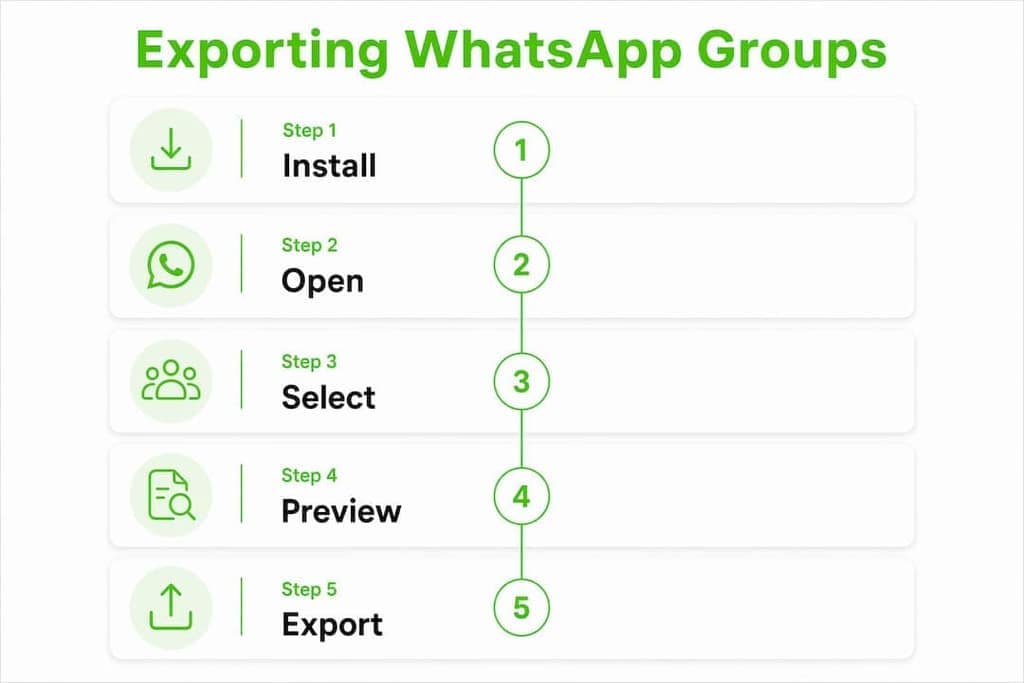
The fastest way to export WhatsApp group members is with Mastros WhatsApp Exporter, a Chrome extension that pulls participant contacts locally and saves them as CSV, JSON, or vCard files without uploading anything to a server. Here's how to get your first export done in under a minute:
- Install the Mastros extension from the Chrome Web Store or the Mastros product page.
- Open web.whatsapp.com, log in, and navigate to the group you want to export.
- Run the extension, choose your format (CSV, XLSX, JSON, or vCard), and save the file locally.
Mastros is built for growth marketers, community managers, and anyone who needs a reliable contact backup. The entire process runs in your browser, which means your data stays on your device.
Table of Contents
- What does the WhatsApp group exporter extension actually do?
- How does a browser-based WhatsApp exporter actually work?
- How to install and run your first group export
- Privacy, safety, and WhatsApp policy: what you must know
- Export formats and how to use the data you pull
- Compatibility, expected limits, and common troubleshooting
- Pricing, quotas, and where to get the extension
- Common use cases and US-specific compliance best practices
- Why choose Mastros' WhatsApp Exporter?
- Key Takeaways
- The case for keeping exports local and honest
- Mastros WhatsApp Exporter is ready when you are
- Sources and where to verify claims
What does the WhatsApp group exporter extension actually do?
Mastros WhatsApp Exporter connects to your active WhatsApp Web session and reads the group participant list directly from the browser. No messages are sent, no automation runs, and nothing is written back to WhatsApp. It's a read-only operation from start to finish.
The core features cover everything most professionals need:
- Group member extraction: Pull the full participant list from any group you're a member of, including admin flags.
- Chat and labeled contacts: Export recent chat contacts and labeled contacts beyond just group members.
- Export formats: CSV, XLSX, JSON, and vCard are all supported, so you can pipe data straight into a spreadsheet or a CRM.
- Exported fields: Each record typically includes phone number, display name, pushname, and admin status.
- Local save: The output file downloads directly to your machine. No cloud upload, no third-party server.
The extension also includes a preview panel so you can review the contact list before committing to a download, and basic filters let you narrow the export by role or contact type.
How does a browser-based WhatsApp exporter actually work?
The short answer: the extension runs inside your browser on top of WhatsApp Web and builds the export file locally. Nothing leaves your device.
Two technical approaches exist for pulling participant data. The simpler one is DOM scraping, where the extension reads the visible member list as you scroll through it. This works, but it's slow and fragile. If you don't scroll far enough, members get missed. On large groups, that's a real problem.

The more reliable approach taps WhatsApp Web's internal storage, specifically IndexedDB and internal module hooks, to pull the full participant array directly. Developer notes from open-source projects confirm that using the Main World execution context and IndexedDB model-storage retrieves participant data faster than DOM scraping and without the scroll-dependency. Mastros uses this approach, which is why it handles large groups more reliably than basic tools.
How to install and run your first group export
Prerequisites: You need Chrome, Edge, or another Chromium-based browser, and you must be logged into WhatsApp Web at web.whatsapp.com before the extension can do anything.
- Install Mastros WhatsApp Exporter from the Chrome Web Store or directly from the Mastros WhatsApp Scraper page. The extension icon appears in your browser toolbar.
- Go to
web.whatsapp.comand confirm your session is active. If you see the QR code, scan it with your phone first. - Open the group you want to export and navigate to the members view. On WhatsApp Web, this is typically the group info panel.
- Click the Mastros extension icon. The extension reads the participant list and populates a preview.
- Choose your export format: CSV, JSON, or vCard.
- Click Download and save the file to your preferred folder.
The full step-by-step walkthrough on the Mastros blog includes screenshots for each step if you want a visual reference.
Pro Tip: If your group has hundreds of members, open the "View All Members" dialog inside WhatsApp Web before running the extension. This ensures the full participant array is loaded into the browser's memory and the extension can capture every member, not just the ones visible on screen.

Privacy, safety, and WhatsApp policy: what you must know
Mastros processes everything locally. Your exported contacts are saved directly to your device, and no user data is recorded or transmitted to external servers. That's the privacy baseline you should expect from any reputable exporter.
Before installing any WhatsApp group exporter extension, run through this checklist:
- Check required permissions: The extension should request access to
web.whatsapp.comonly. Any extension asking for broad access to all websites is a red flag. - Verify the Chrome Web Store listing: Look for a recent last-updated date, a clear developer name, and user ratings. Abandoned extensions with no recent updates carry higher security risk.
- Read the privacy disclaimer: Reputable Chrome Web Store listings include an explicit statement that the extension is unofficial and not endorsed by WhatsApp Inc.
- Understand the account risk: These are unofficial tools. WhatsApp's Terms of Service prohibit automated or unauthorized data collection. Using any exporter carries a non-zero risk of account restriction. Use these tools responsibly and sparingly.
One plain-language legal note: exporting contact data from a group does not give you permission to market to those contacts. Consent and compliance are separate from the technical act of export.
Export formats and how to use the data you pull
Different formats serve different workflows. Here's a quick reference:
| Format | Best for | Typical fields included |
|---|---|---|
| CSV | Spreadsheets, CRM import, mail merge | Phone number, display name, pushname, admin flag |
| XLSX | Excel-based workflows, pivot tables | Same as CSV, formatted for Excel |
| JSON | Programmatic processing, API pipelines | Full record with all available fields |
| vCard | Direct import to phone contacts or Google Contacts | Name, phone number |
A few things worth knowing about the data itself. Numbers for contacts who haven't saved you back will appear as raw international format (e.g., +1XXXXXXXXXX). Display names reflect what you've saved on your device; pushnames are what the contact set for themselves on WhatsApp. For CRM import workflows, normalize all numbers to E.164 format before uploading, dedupe against your existing records, and map the pushname field to a "nickname" or "alias" column rather than the primary name field.
Compatibility, expected limits, and common troubleshooting
Mastros WhatsApp Exporter runs on Chrome, Edge, Brave, and other Chromium-based browsers. Firefox and Safari are not supported. The extension requires an active, logged-in session at web.whatsapp.com — the mobile app alone won't work.
On very large groups, performance can slow down as the extension processes a long participant array. Some basic open-source tools have a hard cap at 500 contacts, exporting only the first 500 members from groups that exceed that number. Mastros's IndexedDB approach avoids this bottleneck for most groups, but extremely large communities may still require a browser refresh mid-session.
If your export fails or comes back incomplete, work through this checklist:
- Open "View All Members" first. The extension needs the full participant list loaded in the browser. If you skip this step on a large group, you'll get a partial export.
- Refresh WhatsApp Web. A stale session causes silent failures. Reload
web.whatsapp.com, confirm you're still logged in, then re-run the extension. - Check the extension version. An outdated version may break after WhatsApp Web updates its internal structure. Update the extension from the Chrome Web Store.
- Clear cookies and re-login. Corrupted session cookies can block the extension from reading group data. Clear site data for
web.whatsapp.comand scan the QR code again. - Try a different Chromium build. If Chrome is giving you trouble, Brave or Edge sometimes handle WhatsApp Web sessions differently. Community troubleshooting notes on GitHub repositories confirm this as a practical workaround.
Pricing, quotas, and where to get the extension
Mastros offers a free tier that covers core export functionality, with paid plans that unlock higher monthly export quotas and advanced filters. The free tier is a reasonable starting point for occasional backups or small groups. If you're running regular exports for marketing or CRM workflows, a paid plan gives you the volume you need without hitting quota walls.
Exact pricing and current quota tiers are listed on the Mastros WhatsApp Scraper page. Check there for the most current numbers, since plans can update. The Chrome Web Store listing is the safest install source; the Mastros product page links directly to it and also provides release notes and version history.
Common use cases and US-specific compliance best practices
The most common reasons people reach for a WhatsApp group data extractor fall into a few clear categories: backing up community member lists before a group gets deleted, importing contacts into a CRM after an event, building outreach lists from qualified communities, and auditing group membership for moderation purposes. Marketing teams also use exported lists for targeted follow-up campaigns after product launches or webinars.
If you're in the US and plan to use exported contacts for outreach, compliance matters:
- TCPA applies to text messages. Sending unsolicited SMS or WhatsApp messages to contacts without prior express written consent can trigger Telephone Consumer Protection Act liability. Don't assume group membership equals consent.
- Maintain opt-out records. If you send any marketing messages, you need a documented opt-out mechanism and records of who has unsubscribed.
- Minimize retained PII. Store only the fields you actually need. A phone number and a name is usually enough; retaining every available field on thousands of contacts creates unnecessary data liability.
- Secure your export files. Treat exported CSV or JSON files like any other file containing personal data. Encrypt at rest, restrict access, and don't leave them in shared folders or public cloud drives without access controls.
Why choose Mastros' WhatsApp Exporter?
The honest answer is that most WhatsApp group exporter tools do the basics. What separates Mastros is the combination of local processing, reliable extraction, and a maintained product with a clear upgrade path.
Key trust signals worth noting:
- Browser-only, local processing. Nothing is uploaded. Your contacts stay on your device, which is the privacy baseline that matters most.
- Chrome Web Store presence. A listed, maintained extension with version history and user ratings is meaningfully safer than a random
.crxfile from a GitHub repo. - IndexedDB-backed extraction. Faster and more complete than DOM scraping, especially on groups with hundreds of members.
- Flexible formats. CSV, JSON, and vCard cover every downstream workflow from spreadsheets to phone imports.
- Mastros blog and how-to guides. Elias publishes detailed technical guides covering the extension's design and privacy model, which is a genuine signal of developer accountability.
- Usable free tier. You can test the extension and run small exports before committing to a paid plan.
Key Takeaways
Mastros WhatsApp Exporter is the recommended choice for privacy-first, browser-based group contact exports because it processes data locally, supports CSV/JSON/vCard output, and handles large groups more reliably than basic DOM-scraping tools.
| Point | Details |
|---|---|
| Local processing only | Mastros runs entirely in your browser; no data is sent to external servers. |
| Verify permissions before installing | Any exporter should request access to web.whatsapp.com only, not all sites. |
| Choose format by workflow | Use CSV or XLSX for CRM import; JSON for code pipelines; vCard for phone contacts. |
| Keep exported files secure | Treat contact exports as personal data: encrypt, restrict access, and minimize retained fields. |
| Get Mastros | Visit the Mastros WhatsApp Scraper page for downloads, quota details, and release notes. |
The case for keeping exports local and honest
There's a version of this conversation that skips straight to "here's how to scrape thousands of numbers for cold outreach," and that's the version worth pushing back on. The technical capability to export a WhatsApp group is genuinely useful. Backing up a community you've spent years building, importing event attendees into a CRM, auditing who's in a moderation group — these are legitimate, practical needs.
The problem is that the same tool used carelessly becomes a liability. Unsolicited messages to exported contacts aren't just a TCPA risk in the US; they erode trust in the communities those contacts came from. A group admin who discovers their members are being cold-messaged will shut down access fast, and rightly so.
What makes Mastros worth recommending isn't just the local processing or the clean export formats. It's that the tool is designed for people who understand the difference between having data and having permission to use it. The how-to guides on the Mastros blog reflect that — they explain the mechanics and the limits, not just the happy path. That's the kind of developer accountability that matters when you're handling other people's contact information.
Mastros WhatsApp Exporter is ready when you are
If you need a privacy-first way to export WhatsApp group contacts without sending your data to a third-party server, Mastros is the direct answer. The free tier gets you started immediately, and paid plans scale with your export volume if you're running regular CRM imports or community backups.
Check the Mastros WhatsApp Scraper page for the current Chrome Web Store install link, quota details, and plan pricing. If you also work with Telegram communities, the Mastros Telegram Scraper covers group members, messages, mutual groups, and bulk media from Telegram Web using the same local, browser-based approach.
Sources and where to verify claims
The technical details and feature claims in this article are drawn from the following primary sources. Where a source is an official product listing, that's noted; where it's a community or open-source project, treat it as a practical reference rather than an authoritative standard.
- Mastros WhatsApp Scraper — official product page: Primary source for features, pricing, and install links. Official listing.
- Mastros blog — how to export WhatsApp group members: Developer-authored how-to with screenshots. Official guide.
- WA Group Number Exporter — Chrome Web Store: Official Chrome Web Store listing used to verify supported formats, privacy disclaimers, and unofficial-tool language.
- Mazafard/wa-plus — GitHub: Open-source project with developer notes on IndexedDB and Main World execution context for participant extraction. Community reference.
- Vizzation/WA-Group-Contacts-Extractor — GitHub: Open-source extractor with documented 500-contact limit and troubleshooting notes. Community reference.
- sezanX/whatsapp-group-contacts-extractor — GitHub: README used to verify typical installation and usage workflow. Community reference.
- Firefox Add-ons — Easy Group Contact Extractor for WhatsApp: Mozilla Add-ons listing for cross-browser context. Official listing.