



On the Mastros Free plan you can export 250 profiles and 300 messages a month, with every tool unlocked and no account needed. Pro ($9/month) raises that to 5,000 profiles and 10,000 messages; Scale ($18/month) to 100,000 profiles and 500,000 messages. Each downloaded media file counts as one message on every plan. If you're planning a bulk export, the plan you pick determines how far a single run gets before you have to wait for the monthly reset. The Mastros Telegram extension exports group members, chat messages and media from Telegram Web to CSV, JSON or JSONL.
TL;DR:
- Free: 250 profiles and 300 messages a month. Pro: 5,000 and 10,000. Scale: 100,000 and 500,000. Every tool is unlocked on every plan.
- Each downloaded media file counts as one message, on every plan, so media-heavy channels use up the message allowance fastest.
- Message and profile quotas are separate; pulling chat history or media does not impact profile exports, and both reset monthly without carryover.
- There is no setup and no mode to choose: the extension reads the Telegram Web session you are already signed into, with no
api_idorapi_hash.- Splitting large exports into smaller date-range chunks and timing them around billing cycles can significantly reduce quota usage and avoid mid-job interruptions.
Table of Contents
- How Telegram Export Limits Work
- No Modes, No Credentials: One Engine for Every Plan
- Planning Realistic Exports for Research, Outreach, and Archiving
- What to Do When You Hit a Quota Mid Export
- Why the Extension Runs Entirely in Your Browser
- How Export Limits Play Out in Large Group Chats
- Will Telegram Export Quotas Change?
- Smart Workarounds When You're Bumping Against a Quota
- Reading Export Error Messages Correctly
- Telegram Export Limits Across Desktop, Mobile, and Web
- Extension Workflows vs. Server-Side Scraping: When to Switch
- Ready to Move Past Free Tier Limits?
- Where to Verify These Numbers Yourself
- Sources
- FAQ
How Telegram Export Limits Work
Two different numbers govern every export, and mixing them up is the fastest way to get blindsided mid run. The per-run cap limits how much a single export job pulls before it stops on its own. The monthly allowance is the total budget across every run you kick off that month, and it doesn't reset until your billing cycle rolls over.
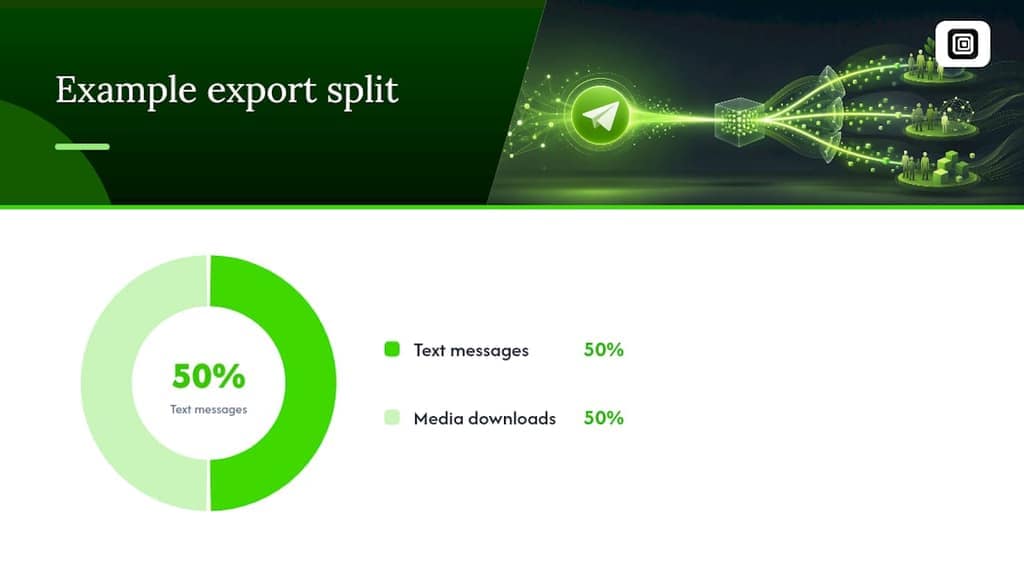
Here's the part that trips people up: media downloads aren't separate from your message quota. Every photo, video, voice note, or document you pull counts as one message equivalent against your monthly total. Export 300 text messages and 300 images in the same run, and you've used 600 of your allowance, not 300. This changes the calculation for media-heavy channels, and it holds on every plan: on Pro and Scale a media file still counts as one message, against a much larger allowance.
Profile and member scrapes run on a separate quota from message exports. Pulling a group's member list doesn't eat into your message allowance, and vice versa. That separation matters for how you sequence a project:
- Message quota covers chat history, comments, and any media pulled from a conversation.
- Profile quota covers group members, recent contacts, and mutual groups.
- Both quotas reset monthly, on the same cycle, regardless of plan tier.
- Neither quota carries over unused capacity to the next month.
The most underrated feature in this whole system is what happens when you hit a wall mid export. If a run stops because you've exhausted a quota or Telegram throws an error, Mastros saves whatever it already collected locally on your machine. Nothing gets lost, and you don't start from zero next month. You just pick up where the run left off.
No Modes, No Credentials: One Engine for Every Plan
Older guides, including an earlier version of this one, describe a choice between a "Web Mode" and a "Power Mode" that asked for an api_id and api_hash from my.telegram.org. That choice no longer exists. Power Mode was removed in v5.0 when the extraction engine was rewritten, and the extension now has a single engine with nothing to configure.
What that means for planning:
- No credentials: no
api_id, noapi_hash, no second login. The extension reads the Telegram Web session you are already signed into. - Every tool on every plan: Recent contacts, Chat messages, All group members, Mutual groups and Media download are all unlocked on Free, Pro and Scale.
- Plans change the allowance, not the capability: Pro and Scale run the same tools as Free with bigger monthly limits.
Telegram still applies its own rate limiting. When requests come too fast, Telegram responds with a FLOOD_WAIT signal telling the client to pause for a set number of seconds. The extension sees that message, waits the time Telegram asks for, then keeps going, and a long run is split into bounded chunks you can carry on from. That is why some very large runs still need you to check in periodically rather than walking away entirely.
Pro Tip: Because there is no setup step, the fastest way to size a job is a small test run. Pull a few hundred messages or members first, check the file, then decide whether the full job fits your monthly allowance.
Planning Realistic Exports for Research, Outreach, and Archiving
The right plan depends entirely on what you're building. Here's how the math works out for three common jobs:
- Small-scale research (a few hundred messages): Free's 300-message allowance covers a short discussion thread or a recent window of a channel. If you need more history, or media from that channel, Pro's 10,000 messages is the next step.
- Outreach lists and recruiting pulls (several thousand profiles): Pro is the practical floor here. Pro's 5,000-profile quota covers most mid-size community scrapes, and because member lists draw on the profile quota, they leave your 10,000 messages untouched.
- Full archives (tens to hundreds of thousands of items): Scale is built for this. Split the job into multiple runs by date range rather than attempting one massive pull, and export to JSONL instead of CSV so the output streams cleanly into whatever analysis tool you're using.
Date filters are your best lever for controlling message-equivalent counts on media-heavy channels. Narrowing a pull to the last 30 days instead of scanning an entire channel's history can cut your quota consumption by an order of magnitude, and it's the difference between finishing a job on Free versus needing to upgrade mid-project. Anyone doing recurring Telegram Web exports for outreach should build date windowing into their standard workflow from the start.
What to Do When You Hit a Quota Mid Export
The extension flags a quota hit directly in its interface, usually with a message telling you which allowance (profiles or messages) ran out and when it resets. That's your cue to stop guessing and check the Export tab, where partial results are already sitting on disk.
- Resume from the Export tab rather than restarting the whole job. Files saved before the interruption remain intact.
- Stagger large runs across multiple sessions instead of one continuous pull.
- Narrow your date window if a channel's history is dense with media.
- Slow the scroll pace manually on very large, fast-moving group chats.
FLOOD_WAIT responses from Telegram look different from a quota hit. They're temporary and specific, telling the client to pause for a set number of seconds before continuing. Mastros backs off automatically when it sees one rather than retrying immediately, which protects your account from stricter throttling later.
Pro Tip: A quota hit and a FLOOD_WAIT often feel identical from the outside, both stop your export, but only one requires waiting for next month. Check the error text before assuming you're locked out.
Why the Extension Runs Entirely in Your Browser
Every export happens inside your own browser session. Nothing gets uploaded to a Mastros server, and nothing gets automated on your behalf. No messages get sent, no invites go out, and no broadcast tools run in the background. The extension reads what your signed-in Telegram Web session already shows you and writes it to a file.
That design isn't arbitrary. Chrome Web Store's Limited Use policy requires extensions to collect only the data they genuinely need and to disclose exactly how that data gets handled. Building client-side, with quotas baked in, is the straightforward way to comply with that standard while keeping your Telegram session under your own control.
Manifest V3's cookie and service-worker constraints mean an extension has to read session data through a content script running in the page itself, not from a background process. It is also why the extension needs no credentials of its own: it reads the session already open in the page, and nothing passes through an external server.
The same-origin rules that govern browser extensions explain why this architecture exists in the first place, and why quotas double as a practical safeguard against overreach.
How Export Limits Play Out in Large Group Chats
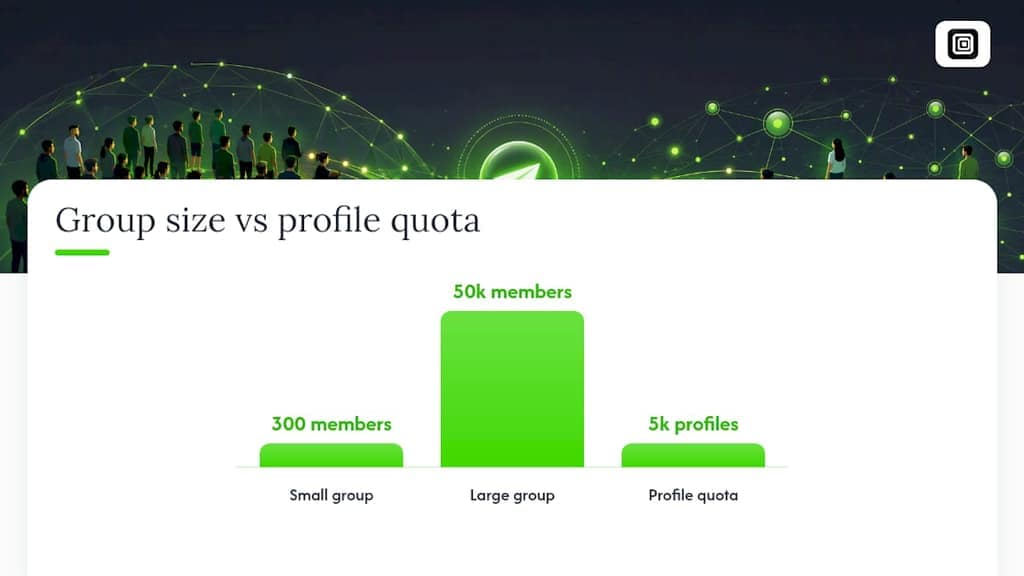
A 50,000-member group behaves very differently under quota math than a 300-person channel. The 5,000-profile ceiling on some plans gets you further but may still be short of a full membership pull on very large groups. Higher profile quotas make full-membership exports of large communities more feasible within a monthly cycle.
Message history in active large channels compounds the same problem differently. A high-traffic crypto or trading channel can generate tens of thousands of messages a month on its own, and if members are sharing images or voice notes regularly, every one of those counts toward your message allowance, on every plan. This is where Pro and Scale earn their keep: pulling from a channel with thousands of daily posts needs a message allowance in the thousands, and Free's 300 messages a month covers only a small recent window.
The practical takeaway for anyone managing exports from large channels: treat scope like a budget from day one. Decide whether you need the full member list or a representative sample, and whether you need every message ever posted or just a recent window. Large-channel exports are exactly where date filtering and run splitting stop being optional and become the only way to finish the job without waiting on a quota reset.
Will Telegram Export Quotas Change?
Quota numbers aren't fixed forever. As Telegram's own API behavior shifts, whether that's tighter FLOOD_WAIT thresholds, changes to what MTProto exposes, or adjustments to how Telegram Web renders content, extension quotas tend to move in response. Mastros has already scaled its tier structure once, from a simpler free/paid split toward the current Free, Pro, and Scale breakdown, and further adjustments are a normal part of maintaining compatibility with a platform that isn't standing still either.
The more predictable trend is toward higher ceilings on paid tiers rather than tighter ones. Export tools in this category, including other Telegram-focused Chrome Web Store listings, generally follow the same pattern: free tiers stay modest to control server load and abuse risk, while paid tiers expand as demand for bulk research and outreach tooling grows.
What almost certainly won't change is the underlying architecture. Client-side processing and Limited Use compliance aren't temporary constraints Mastros will drop once it has more users; they're the foundation the entire product is built on. If you're planning a workflow that depends on current quota numbers holding steady for a specific project, check the Chrome Web Store listing before you commit, since tier details are the one part of this system most likely to get refined as the extension matures.
Smart Workarounds When You're Bumping Against a Quota
The most effective workaround isn't a trick. It's sequencing your work so quotas stop being a constraint at all. Export member lists and message history in separate runs since they draw from different quotas, and you effectively double your monthly capacity by not letting one job block the other.
Date filtering does more work than most people give it credit for. Instead of exporting a channel's entire three-year history in one pass, break it into quarterly or monthly chunks. Each chunk stays well under your allowance, and you end up with cleaner, more manageable files anyway. This matters even more on media-heavy channels, where a single chunk avoiding a huge photo dump can be the difference between finishing on Free and needing Pro.
For teams running exports regularly rather than once, timing runs around your billing cycle avoids the scramble of hitting a wall three days before reset. Start large jobs early in the cycle, not late, so a quota hit still leaves room to finish before the reset clock runs out. If your work involves feeding exported data into CRM systems or reporting pipelines, structuring exports in JSONL from the start also saves a conversion step later and keeps files lean enough to avoid unnecessary re-runs.
The last lever, upgrading tiers, isn't really a workaround so much as the intended path. If you're consistently splitting jobs across months just to stay under Free's ceiling, the time cost of that workaround usually exceeds the price difference to Pro.
Reading Export Error Messages Correctly
Most export interruptions fall into one of three categories, and knowing which one you're looking at determines what to do next. A quota exceeded message means you've hit either your profile or message allowance for the month; the fix is to wait for reset or upgrade your tier, not to retry immediately. A FLOOD_WAIT response comes from Telegram itself, not from Mastros, and it's temporary. The extension detects this signal and pauses automatically for the specified duration before resuming.
A session or authentication error typically shows up when your Telegram Web login has expired. There are no API credentials to misconfigure, because the extension uses none. Since the extension reads your session through a content script running in the page itself, this usually means refreshing Telegram Web and confirming you're still logged in, rather than a problem with the extension.
The troubleshooting sequence that works across all three:
- Read the exact error text before doing anything. "Quota" and "wait" are different problems with different fixes.
- Check the Export tab for partial results before restarting. They're almost always still there.
- For session errors, refresh Telegram Web and confirm your login is active.
- For FLOOD_WAIT, let the extension's backoff run its course rather than closing and reopening the tab.
- For quota errors, check your plan's reset date before assuming you need to upgrade.
Retrying too quickly after a FLOOD_WAIT is the one mistake that can escalate a temporary pause into a longer restriction, so patience here genuinely pays off.
Telegram Export Limits Across Desktop, Mobile, and Web
Telegram's own built-in export tools vary by platform, and that's worth knowing even though it's a separate system from extension quotas entirely. Desktop offers the most complete native export, mobile apps offer a more limited version, and Telegram Web on its own doesn't include a native bulk export feature at all, which is exactly the gap extensions like Mastros fill.
Because Mastros operates through Telegram Web's interface, it only runs in Chrome or a Chrome-like browser on web.telegram.org. It does not work inside Telegram Desktop, the phone apps or other Telegram clients, so whichever machine you use, the export happens in the browser.
For teams splitting work across several people, the planning unit is the plan, not the device. The Free plan needs no account at all: each person who installs the extension starts with 250 profiles and 300 messages a month. Pro and Scale raise those limits for the person on the plan. If several teammates are each running regular exports, compare each person's monthly volume against the tiers rather than assuming one allowance covers the whole team.
Extension Workflows vs. Server-Side Scraping: When to Switch
Extensions win for a reason people underestimate: they get you a finished export in minutes, on an authenticated page, with zero infrastructure. For anything under a few thousand items, that speed advantage usually outweighs whatever server-side setup would theoretically offer. Most growth and research work falls squarely in that zone.
The tipping point comes from two variables together, not one. If your corpus regularly exceeds hundreds of thousands of items and you need it refreshed on a recurring schedule without a person clicking "start," server-side scraping starts making more sense. A single Scale-tier export of a large archive is still a browser job worth doing in-extension. A nightly automated pull across dozens of channels is a different problem entirely, one that needs infrastructure Mastros isn't built to be.
Don't confuse setup friction with total cost. Server-side pipelines demand engineering time, hosting, and ongoing maintenance that an extension workflow skips entirely. Unless you're genuinely operating at that unattended, large-scale end of the spectrum, the extension route remains the more sensible default.
— Elias Mahdavi
Ready to Move Past Free Tier Limits?
Mastros's Free tier is the right place to confirm the extension does what you need before committing to anything: 250 profiles and 300 messages a month, every tool unlocked and no account needed, is enough to test a workflow on a real channel. Once you're running exports regularly, Pro ($9/month) gives you 5,000 profiles and 10,000 messages, which matters most for media-heavy channels where every photo or voice note counts as one message. Scale ($18/month) exists for the outlier jobs: full-archive projects and research runs that need 100,000 profiles and 500,000 messages. Every plan runs the same tools.
If media downloads are your main bottleneck, the Telegram Video Downloader page covers how media runs count against each plan. Check your current usage against these tiers and upgrade directly from the extension when you're ready.
Where to Verify These Numbers Yourself
Quota figures and plan details are listed on the Mastros Chrome Web Store page, which stays current as tiers evolve. For the compliance side of client-side design, Chrome's Limited Use policy documentation covers what extensions can and can't do with collected data. Readers wanting the format side of large exports can check the JSONL export guide for pipeline-ready output.
Sources
- Mastros — Telegram Data and Media Scraper - Chrome Web Store
- Limited Use | Chrome Web Store - Program Policies | Chrome for Developers
- Dev
- Server Scrapers vs Browser Extensions: 2026 Tradeoffs — BulkMD
FAQ
What Is the Monthly Message Quota on Mastros's Free Plan?
Free gives you 300 messages and 250 profiles per month, with every tool unlocked and no account needed. Each downloaded media file counts as one message.
Does Media Count Toward My Telegram Export Quota?
Yes. On every plan each downloaded media file counts as one message. Pro (10,000 messages a month) and Scale (500,000) simply give media-heavy runs far more room than Free's 300.
Do I Need Power Mode or API Credentials for Bigger Exports?
No. Power Mode was removed in v5.0 when the extraction engine was rewritten. There is now one engine with no credentials and no modes; bigger exports come from a bigger plan allowance, not from a different mode.
What Happens if My Export Hits a Quota Limit Mid Run?
Mastros saves everything collected so far locally, and you can resume the run from the Export tab once your quota resets or you upgrade.
When Should I Switch From an Extension to Server-Side Scraping?
Stay with an extension for anything under a few thousand items or occasional runs; consider server-side tooling only for unattended, recurring jobs well into the hundreds of thousands.