


The fastest way to get a structured export from Telegram Web is to install the Mastros Chrome extension, open web.telegram.org, pick a tool, and hit Start. There are no API keys to enter and no mode to choose. Your data downloads as CSV, JSON, or JSONL directly to your machine. No server upload. No credentials shared with anyone. The Mastros Telegram extension exports group members, chat messages, recent contacts and media.
Three things worth knowing before you dive in:
- All processing runs client-side in your browser. Mastros never touches your data on a server.
- The extension is Manifest V3 compliant, the current Chrome security standard.
- The free tier covers 250 profiles and 300 messages per month, with every tool unlocked and no account needed. That's enough to validate any workflow before you commit to a paid plan.
Key Takeaways
Mastros' privacy-first Chrome extension is the most direct path from Telegram Web to a structured CSV, JSON, or JSONL export, with all processing running client-side and no credentials to enter at all.
| Point | Details |
|---|---|
| Start with the free tier | 250 profiles and 300 messages a month cover workflow validation before any paid commitment. |
Use telegram_user_id as your key |
This numeric ID is stable across username and display name changes; build dedupe rules around it. |
| No setup, no modes | One engine reads the Telegram Web session you are already signed into; every tool, Mutual Groups included, works on every plan. |
| Apply privacy controls before storing | Encrypt exported files at rest, restrict access by role, and document your retention policy. |
| Mastros for production exports | Five tools, Manifest V3 compliance, and client-side processing make it the recommended tool for growth teams. |
Table of Contents
- How to run your first Telegram web export in under 60 seconds
- What you can extract from Telegram Web: tools, outputs, and example fields
- Which export format should you use, and how do you map fields to a CRM?
- No setup: one engine, no credentials, no modes
- Privacy, security, and U.S. legal considerations
- Plans, quotas, and when you should upgrade
- Troubleshooting and best practices to avoid common issues
- Advanced options and technical notes for developers
- How to move a media archive to cloud storage or a third-party system
- Exporting from Telegram Web when chats contain multiple languages or emoji
- What most teams get wrong about Telegram exports
- Mastros makes this the whole workflow, not just the export step
- Sources
- FAQ
How to run your first Telegram web export in under 60 seconds
Good news: this is genuinely a 60-second job.
- Install the Mastros Telegram extension from the Chrome Web Store.
- Open Web in the same browser.
- Click the Mastros sidebar icon that appears in the browser toolbar.
- Pick a tool: Group Members, Chat Messages, Recent Contacts, Mutual Groups, or Media Download.
- Nothing to configure: there are no API credentials to enter. The extension reads the Telegram Web session you are already signed into.
- Click Start. Watch the live progress feed in the sidebar.
- When the run finishes, go to the Export tab and download your session file.
Pro Tip: Open the downloaded CSV in Google Sheets immediately and check that telegram_user_id is populated for every row. If it's missing on more than a handful of records, the run hit a permission wall — check your group membership and retry.
Before starting any run, confirm you're a member of the group you're scraping, and avoid running exports on private chats you don't have legitimate access to. Respecting access boundaries keeps your account in good standing.
What you can extract from Telegram Web: tools, outputs, and example fields
Mastros has five tools, each targeting a different data type:
- Recent contacts: names and @handles from your latest chats.
- Chat messages: the open chat, with who wrote each message and when.
- All group members: one group, many groups, or pasted t.me links. Repeats are removed.
- Mutual groups: see which groups you share with someone, then save the members.
- Media download: photos, videos, audio, voice notes, GIFs, stickers and files in one ZIP.
A few notes on behavior:
- Media archives download files at original quality, each paired with a message reference so you can trace every asset back to its source row.
- Partial results are saved automatically. If a run stops early (rate limit, network drop), the session file captures what was collected up to that point.
- Chat Messages exports can handle large volumes where supported, and session files let you resume or review without re-running from scratch.
Which export format should you use, and how do you map fields to a CRM?
CSV is the right call for anything going into Excel, Google Sheets, or a simple HubSpot import. JSON works well for API-driven pipelines. JSONL is the format to use for large streaming exports into ETL tools like Make or Zapier, because each line is a self-contained record that parsers can process without loading the full file into memory.
For CRM mapping, use telegram_user_id as your stable primary key. Usernames change. Display names change. The numeric ID does not.
A minimal HubSpot mapping checklist:
telegram_user_id→ custom contact property (dedupe key)username→ secondary identifierdisplay_name→ Contact Namemessage_text(excerpt, 200–300 characters) → Notes or custom "Last Message" propertytimestamp→ Last Activity Datesource_group→ custom "Lead Source Detail" property
Pro Tip: Store only message excerpts in your CRM. Keep full message text behind access controls (a secured S3 bucket or encrypted database column). This limits your PII exposure and keeps CRM records lean.
For recurring ingestion, a Make or Zapier webhook that watches a local folder for new JSONL drops and pushes records to HubSpot is a practical pattern. No custom code required.
No setup: one engine, no credentials, no modes
| Capability | Mastros (current version) |
|---|---|
| Group Members | Yes: one group, many groups, or pasted t.me links |
| Chat Messages | Yes |
| Recent Contacts | Yes |
| Mutual Groups | Yes |
| Bulk Media Download | Yes, as one ZIP |
| Telegram API credentials required | No |
| Modes to choose between | None |
There is nothing to choose here any more. Earlier 4.x versions split the extension into a "Web Mode" and a "Power Mode" that asked for your own api_id and api_hash; Power Mode was removed in v5.0 when the extraction engine was rewritten. Today a single engine reads the Telegram Web session you are already signed into, so every tool works the moment you install it and there is no credential for Mastros to store.
Credentials still matter if you build your own exporter. Scripts on Telethon or another MTProto library open a new client connection, which is why they need an api_id and api_hash from my.telegram.org. The Bot API is a different path again: a bot cannot list a group's participants without admin rights or walk a chat's full history.
Quick decision checklist:
- Use the extension for member lists, chat messages, mutual groups and media from chats your account can already open, with no setup.
- Use your own MTProto script only if you need unattended, scheduled jobs and are prepared to manage your own
api_id/api_hashand session.
Privacy, security, and U.S. legal considerations
Mastros processes everything client-side. Your exported data never leaves your machine through Mastros' infrastructure. That architecture matters when you're handling PII, because it eliminates a whole category of third-party data exposure risk.
That said, the tool doesn't remove your responsibility for what you do with the data. A practical U.S.-focused checklist:
- Export only data from groups you're a legitimate member of.
- Respect Telegram's Terms of Service. Mass harvesting of personal data from private communities can violate platform rules.
- Apply data minimization: capture only the fields your workflow actually needs.
- Store exported files with encryption at rest (AES-256 is standard for cloud storage like S3 or Google Cloud Storage).
- Use role-based access controls on any shared drive or database holding exported PII.
- Document your retention policy. If you don't need a record after 90 days, delete it.
- Anonymize or pseudonymize data before sharing it with third parties.
Forensic research confirms that messaging app artifacts, including contacts and conversation content, can persist in local files and memory. Treat your exported files with the same care you'd apply to any sensitive business data.
This section is general information, not legal advice. For complex compliance questions, consult qualified legal counsel.
Plans, quotas, and when you should upgrade
The free tier provides 250 profiles and 300 messages per month, with every tool unlocked and no account needed, sufficient for initial testing and small recurring exports.
Upgrade signals to watch for:
- You're hitting the monthly profile or message cap before the month ends.
- You need Mutual Groups or bulk media at scale (each downloaded file counts as one message).
- You run exports often enough that the monthly reset is slowing you down.
- Your team needs higher volume limits.
Pro ($9/month) raises the limits to 5,000 profiles and 10,000 messages; Scale ($18/month) to 100,000 profiles and 500,000 messages. Every plan runs the same tools. Billing runs through Stripe, and you can switch or cancel plans at any time.
For procurement teams, the key questions to answer before selecting a plan: expected monthly profile volume, message volume, and whether you need media archives.
Troubleshooting and best practices to avoid common issues
Rate limits and PEER_FLOOD errors are the most common failure mode. If Telegram throttles your session, stop the run, wait 10–15 minutes, and retry with a smaller batch. Don't hammer the same session repeatedly.
Numbered steps for a clean, reproducible run:
- Clear any stale sessions from the Export tab before starting a new run.
- Set batch size conservatively for large groups (under 500 members per run if you're hitting limits).
- Download the session file immediately after each run completes.
- Use
telegram_user_idas your dedupe key when merging exports from multiple groups. - Normalize usernames to lowercase before merging (usernames are case-insensitive on Telegram).
- Keep Chrome or Edge updated. Manifest V3 behavior can shift with browser updates.
- Disable other extensions that inject scripts into web pages if you see unexpected sidebar behavior.
The extension reads your Telegram Web session, so keep the Telegram Web tab open and signed in for the length of a run. If a run fails with a session error, refresh Telegram Web and confirm you are still logged in.
Advanced options and technical notes for developers
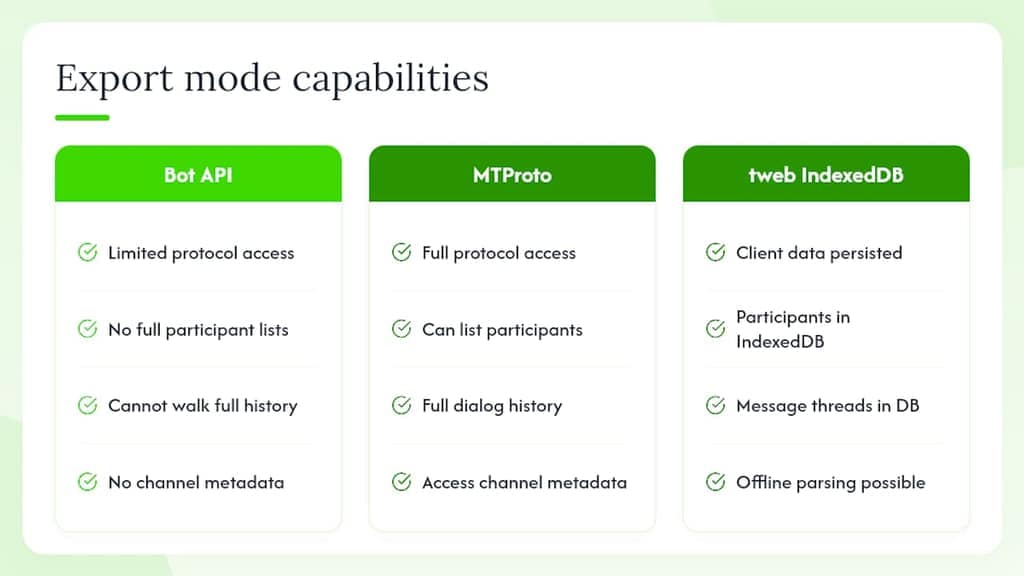
If you are weighing a homemade exporter, the protocol choice matters. The Bot API exposes a limited subset of Telegram's capabilities. It cannot retrieve full participant lists without admin rights, cannot walk complete dialog history, and cannot access certain channel metadata. MTProto, the native client protocol that Telegram Web itself uses, has none of those restrictions, but a standalone MTProto script needs its own api_id and api_hash.
For developers who want to go deeper, Telegram Web (the "K" or tweb client) persists messages, users, and chats in an IndexedDB store named tweb. Extracting that data requires walking nested records and mapping peerId and fromId fields to reconstruct message threads and user directories. This is an advanced offline parsing approach, useful for forensic or archival work, but Mastros handles this mapping automatically during a live export run.
Pro Tip: For large message exports going into an ETL pipeline, choose JSONL. Each line is a valid JSON object, so your pipeline can process records as they stream in rather than waiting for the full file to load. Pair media files with their message_id tokens in the filename to preserve relational integrity between the archive and your message rows.
For recurring ingestion, the pattern that works: run the export yourself on a fixed cadence (the extension only acts when you start it), drop the JSONL into a watched folder, and let a Make or Zapier webhook ingest it into your CRM or data warehouse. Incremental syncs beat full re-scrapes every time.
How to move a media archive to cloud storage or a third-party system
After a Media Downloader run, your archive lands as a folder of files plus a reference CSV or JSONL that maps each filename to its message_id, sender_id, and timestamp.
- Rename files using the
message_idtoken if your downstream system requires unique, stable filenames. - Upload the folder to your cloud storage bucket (AWS S3, Google Cloud Storage, or Azure Blob Storage) using the provider's CLI or desktop sync client.
- Set bucket-level encryption and restrict public access before uploading.
- Import the reference CSV/JSONL into your database or asset management system, using
message_idas the foreign key that links each file to its source message record. - For large archives, use multipart upload (S3) or resumable uploads (GCS) to avoid timeout failures on slow connections.
- Verify file counts after upload: the number of rows in the reference file should match the number of files in the bucket.
Exporting from Telegram Web when chats contain multiple languages or emoji
UTF-8 encoding handles most of this automatically. Mastros exports in UTF-8 by default, so Arabic, Chinese, Cyrillic, Thai, and emoji all export cleanly without manual encoding steps.
A few practical notes:
- When opening a CSV in Excel on Windows, use Data > From Text/CSV and explicitly select UTF-8 encoding. Double-clicking a CSV file often defaults to a Windows legacy encoding that corrupts non-ASCII characters.
- Google Sheets handles UTF-8 CSVs correctly on import with no extra steps.
- Emoji in
message_textfields export as their Unicode code points in JSON/JSONL, which most modern databases and pipelines handle natively. - If you're running text analysis (sentiment, NLP) on multilingual exports, tag each record with a
detected_languagefield during preprocessing. Tools likelangdetect(Python) or Google's Natural Language API can do this at scale. - Right-to-left languages (Arabic, Hebrew) display correctly in the raw file. Rendering in spreadsheets depends on the application's RTL support, not the export format.
What most teams get wrong about Telegram exports
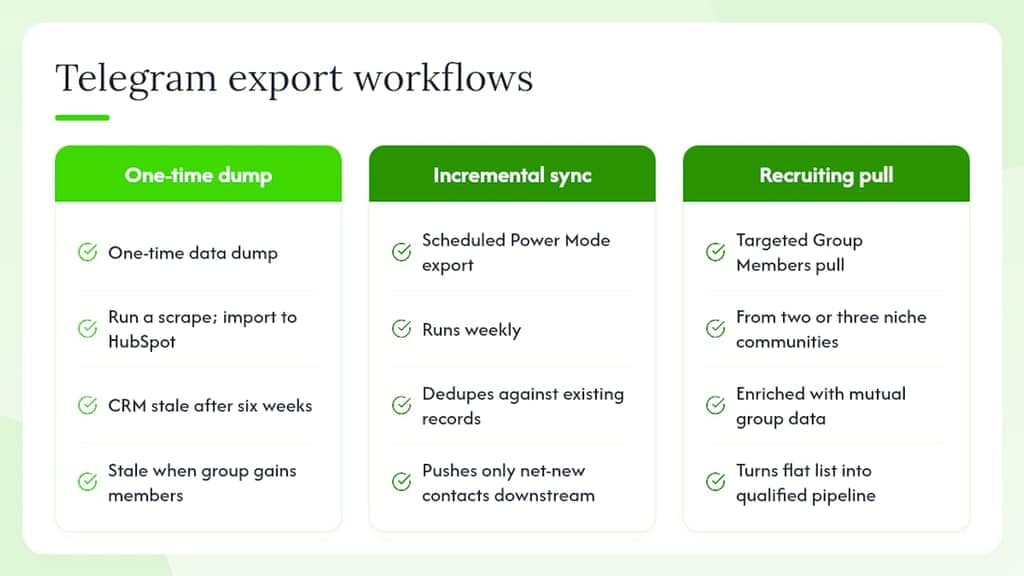
The biggest mistake growth teams make is treating Telegram exports as a one-time data dump rather than a repeatable workflow. You run a scrape, import it into HubSpot, and then six weeks later the group has 400 new members and your CRM is stale. The teams that get the most value from this process build an incremental sync: a weekly export, run on a fixed day, that dedupes against existing records using telegram_user_id, and only pushes net-new contacts downstream.
The second mistake is skipping the legal and ethical layer. Exporting member lists from a public crypto trading group is very different from scraping a private professional community where members have a reasonable expectation of privacy. The tool gives you the capability; the judgment call is yours. A good rule of thumb: if you wouldn't be comfortable telling the group admin exactly what you're doing with the data, reconsider the use case.
For recruiting specifically, the highest-signal workflow isn't the largest export. It's a targeted Group Members pull from two or three niche communities, enriched with mutual group data to understand which other communities a candidate participates in. That context turns a flat list into a qualified pipeline.
Mastros makes this the whole workflow, not just the export step
Five tools, four export formats (CSV, JSON, JSONL and ZIP for media), client-side processing, and a free plan you can start today without a credit card. That's the short version.
The longer version: Mastros' Telegram exporter covers Group Members, Chat Messages, Recent Contacts, Mutual Groups, and bulk Media in a single extension. There is one engine and nothing to set up: no API credentials, no modes. Every export stays on your machine. The extension is Manifest V3 compliant. Free tier limits are 250 profiles and 300 messages per month, with clear upgrade paths to Pro and Scale when your volume grows.
For follow-up workflows, the Mastros blog covers exporting group members to CSV and downloading all media from a group or channel in detail. Start with the free plan, run your first export, and upgrade when the quotas become the constraint.
Sources
- Mastros — Telegram Data and Media Scraper - Chrome Web Store
- openhuman / telegram_scanner extract.rs (GitHub)
This article is general information, not a substitute for advice from a qualified lawyer. Consult a qualified legal professional about your own circumstances before acting on anything here.
FAQ
What can Mastros' Telegram exporter export?
It exports group members, chat messages, recent contacts, mutual groups, and bulk media from Telegram Web, delivered as CSV, JSON, JSONL, or a media archive, all processed locally in your browser.
Do I need Telegram API credentials to use Mastros?
No. There is no API ID, API hash or bot token to obtain. Earlier versions had a "Power Mode" that asked for an api_id and api_hash; it was removed in v5.0 when the extraction engine was rewritten. The extension reads the Telegram Web session you are already signed into and works immediately after install.
What is the free tier limit?
The free plan covers 250 profiles and 300 messages per month, with every tool unlocked and no account needed. It's enough to validate your export workflow before upgrading to a higher-volume plan.
Why use telegram_user_id instead of username as a primary key?
Usernames on Telegram can be changed or removed at any time. The numeric telegram_user_id is permanent and makes a reliable dedupe key for CRM imports and incremental syncs.
Is it legal to export Telegram group member data in the United States?
Legality depends on context: the group's privacy settings, members' reasonable expectations, and how you use the data. Export only from groups you're a legitimate member of, apply data minimization, and consult legal counsel for complex compliance questions.