


How to get a Telegram API hash:
- Log in at my.telegram.org with your phone number and the code Telegram sends to your app.
- Open API development tools.
- Create an application. A title and a short name are enough.
- Copy the api_id and api_hash shown on the next page.
The api_hash is the permanent secret paired with your api_id. You need the pair for Telethon, Pyrogram or any other MTProto client. Mastros needs neither: the extension exports from Telegram Web through the session already signed in, and never asks for a credential.
Which credential is which:
api_id+api_hash: from my.telegram.org. For MTProto clients: Telethon, Pyrogram, GramJS, tdl. Permanent, and Telegram offers no way to revoke one.- Bot Token: from BotFather. For the HTTP Bot API only. Not interchangeable with
api_id/api_hash. - Nothing at all: for a browser extension reading Telegram Web. There is no credential step, because the session in the tab already carries the authentication.
If you are writing code against Telegram, read on: the sections below cover generating credentials, what exposure costs you, and the errors that come up. If you just need group members or recent messages in a spreadsheet, the Telegram scraper does that with nothing to register.
Table of Contents
- What the Telegram API Hash is (and what it isn't)
- How to get your Telegram API ID and API Hash
- Security risks when an API Hash is exposed
- Why a browser extension needs no API credentials
- When you need an API hash, and when you don't
- Common errors with API credentials and how to fix them
- Developer notes on embedding and distributing credentials safely
- Key Takeaways
- Why "just generate an API hash" is the wrong default
- Export Telegram data your way with Mastros
- Useful sources
What the Telegram API Hash is (and what it isn't)
The api_id and api_hash are application identity credentials for Telegram's MTProto protocol. Think of them as the username and password your app uses to identify itself to Telegram's servers, not your personal account login.
api_id: A numeric identifier for your registered application.api_hash: A secret string that authenticates that application. Per Telethon's documentation, it must never be published. It's functionally tied to the application identity, not to any individual user session.- Bot API Token (BotFather): Issued per bot, used for the HTTP-based Bot API. It is not interchangeable with an
api_hashand won't work for MTProto client access. secret_token(webhook): A separate header value used to verify that webhook payloads actually come from Telegram. It has nothing to do with client authentication.
One critical fact: Telegram does not provide a way to revoke or regenerate an API Hash once it's created. It's permanent. That permanence is what makes exposure so costly: there's no "rotate and move on."
Pro Tip: Never use your api_hash for bot authentication or webhook verification. Each credential type has one job. Mixing them up is the most common setup mistake.
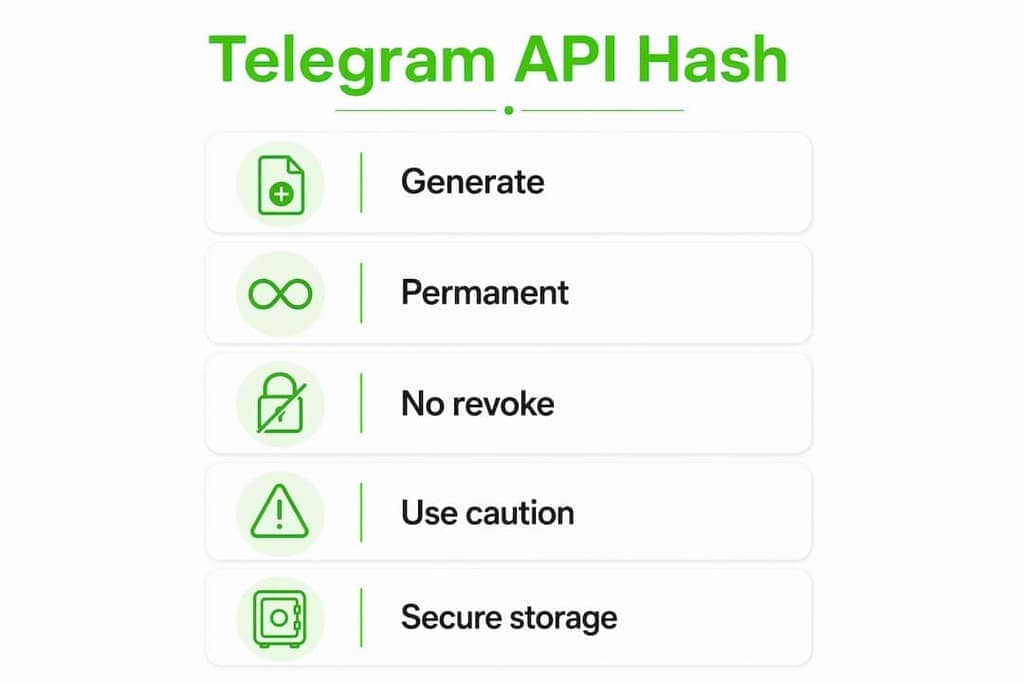
How to get your Telegram API ID and API Hash
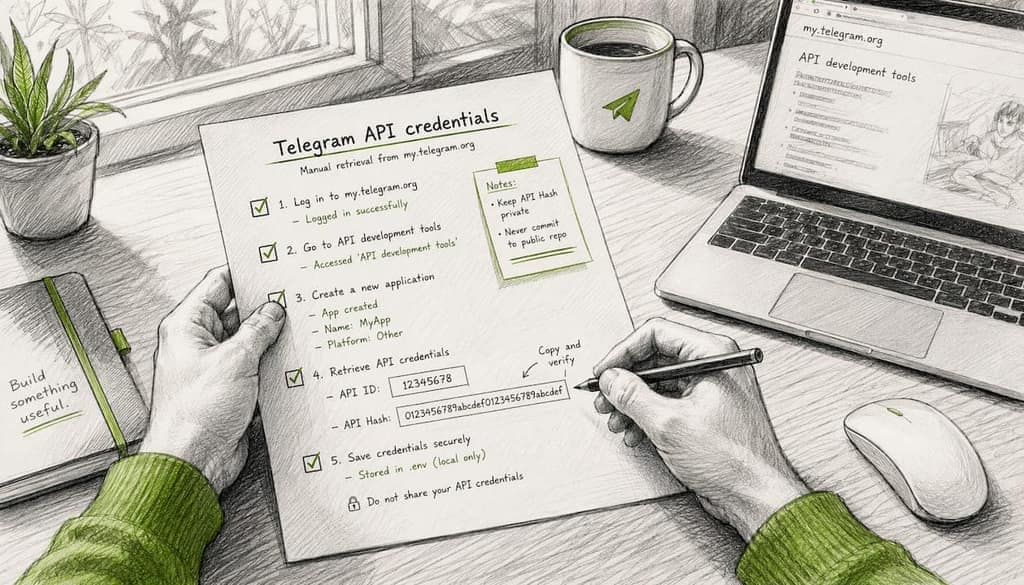
You generate these credentials once at my.telegram.org. The process takes about two minutes.
- Go to my.telegram.org and sign in with the phone number attached to your Telegram developer account. You'll receive a confirmation code via Telegram.
- Open "API development tools" from the main menu.
- Create a new application. Fill in the app title, short name, and platform. The URL field is optional for personal tools.
- Copy your
api_idandapi_hash. They appear immediately after creation. Store them somewhere secure: a password manager works well. - Close the tab. Don't leave these values in a browser session or a sticky note.
Never share your
api_hashpublicly or paste it into a forum when asking for help. Because it can't be revoked, a leaked hash is a permanent liability. If you're testing, use a dedicated developer account, not your primary Telegram account.
Third-party integrations (from enterprise chat platforms to data readers) all follow this same my.telegram.org workflow, which confirms the process is consistent regardless of what you're connecting to.
Security risks when an API Hash is exposed
The permanence of api_hash is the core risk. Unlike a password you can reset or an OAuth token you can revoke, a leaked api_hash stays valid until you create an entirely new application, which means a new api_id too, and updating every integration that uses it.
What exposure actually enables: An attacker with your api_id and api_hash can instantiate a full MTProto client and read messages, contacts, and group data as your application. That's not a theoretical risk.
Practical protections:
- Never hardcode credentials in public source code repositories.
- Obfuscate values or distribute compiled binaries rather than shipping readable source with embedded secrets.
- For user-facing tools, prompt users to supply their own
api_id/api_hashrather than bundling yours. - Store credentials in encrypted local storage, not plaintext config files.
- For webhook integrations, always implement the
secret_tokenheader insetWebhook. Omitting it leaves your endpoint open to spoofed payloads even over HTTPS. - Watch for
API_ID_PUBLISHED_FLOODerrors: they signal that a shared or sampleapi_idis in use, which triggers server-side rate limits.
Pro Tip: Treat your api_hash like a non-rotatable secret from day one. Design your storage and distribution around the assumption that rotation is not an option, because it isn't.
Why a browser extension needs no API credentials
The credential exists to solve a problem a browser extension does not have. An MTProto client is a new client: it opens its own connection to Telegram's servers and has to identify itself, which is what api_id and api_hash are for. Telegram Web is an existing, already-authenticated client. An extension running alongside it reads through that session, so there is no new client to identify and no handshake to perform.
That is the whole of it, and it has three consequences worth stating:
- Nothing to register. No my.telegram.org application, no waiting, no second login.
- No permanent secret in a third-party tool. The risk described in the section above simply does not arise, because there is no credential to hand over.
- The depth comes from the data layer, not the credential. A well-built extension reads Telegram's own structured data rather than the text painted on screen, which is why handles, bios and profile fields the interface never renders still come back.
The Mastros Telegram scraper works this way: a single engine, no credentials, no modes to choose between. Earlier 4.x versions offered a "Power Mode" that asked for your own api_id and api_hash; that was removed in v5.0 when the extraction engine was rewritten. If you set credentials up under an older version, the extension no longer uses or stores them.
Pro Tip: Libraries like Telethon require session_name, api_id and api_hash to instantiate an MTProto client. That requirement is real and unavoidable when you are the one opening the connection. It disappears entirely when you are reading through a connection that already exists.
When you need an API hash, and when you don't
| You are… | Credential needed |
|---|---|
| Writing a Telethon / Pyrogram / GramJS script | api_id + api_hash |
| Running a CLI tool like tdl | api_id + api_hash |
| Building a bot | Bot Token from BotFather |
| Exporting from Telegram Web with an extension | None |
| Using Telegram Desktop's built-in export | None |
The rule underneath the table: you need credentials when your code opens its own connection to Telegram, and you do not when you are reading through a connection Telegram already opened for you.
Anything in the first three rows is worth the setup, because those tools can do things a browser cannot: scheduled unattended runs, incremental sync, full protocol access. If that is what you need, generate credentials and treat them as the permanent secret they are. If you need group members or recent messages in a file, the credential step buys you nothing. For a fuller comparison of the two architectures, see Telegram API vs browser extension, and for the five export methods side by side, how to export Telegram messages.
Common errors with API credentials and how to fix them
API_ID_PUBLISHED_FLOOD: You're using a shared or sampleapi_id, the one from Telegram's documentation examples. Fix: generate your own credentials at my.telegram.org and replace the sample values entirely.- Login failures at my.telegram.org: Confirm you're using the phone number tied to your Telegram account, not a secondary number. Two-step verification must be completed in the Telegram app before the portal will issue credentials.
- "Invalid API Hash": You've likely pasted a Bot Token (from BotFather) instead of your
api_hash. Bot Tokens look like123456:ABC-DEF1234.... They're for the HTTP Bot API, not MTProto. Yourapi_hashis a 32-character hex string. - Session conflicts: Running multiple MTProto clients with the same credentials simultaneously can trigger Telegram's flood protection. Use one active session per
api_id.
Pro Tip: When troubleshooting, always confirm which credential type the field expects: api_id (numeric), api_hash (hex string), or Bot Token (alphanumeric with colon). Pasting the wrong type is the most common cause of authentication failures.
Developer notes on embedding and distributing credentials safely
If you're building or distributing a Telegram integration that uses MTProto, how you handle credentials in your codebase matters as much as how you generate them.
- Never hardcode
api_id/api_hashin public repositories. Even private repos carry risk if access controls change. Use environment variables or encrypted config files. - For user-facing tools, ask users for their own credentials rather than shipping yours. That is the recommendation in Telethon's signing-in documentation for any tool distributed as source code. Better still, build so that no credential is needed at all.
- Distribute compiled binaries when possible. Compiled code makes credential extraction significantly harder than readable Python or JavaScript source.
- Store user-supplied credentials client-side only. Encrypted browser storage or a local keychain, never a remote server.
- Run a secrets audit before any public release. Tools like assets.dev/mcp can help scan for accidentally committed credentials.
- Monitor for rate-limit signals. Unexpected
FLOOD_WAITorAPI_ID_PUBLISHED_FLOODerrors often indicate credential misuse or sharing.
Pro Tip: Design for the assumption that your source code will eventually be public. If your integration can't survive that scenario, it's not ready for distribution.
Key Takeaways
Your Telegram API Hash is a permanent, non-revocable application secret: treat it accordingly, always generate your own rather than reusing a sample, and skip the credential entirely when the job does not need protocol access.
| Point | Details |
|---|---|
| API Hash is permanent | Telegram cannot revoke or regenerate it; a leak requires creating a new application entirely. |
| Browser exports need no credentials | Reading through an authenticated Telegram Web session runs locally without api_id or api_hash, the lower-risk default. |
| MTProto clients require your own credentials | Always generate your own api_id/api_hash at my.telegram.org; never use shared or sample values. |
| Obfuscate before distributing | Compiled binaries or user-supplied credentials reduce leak risk in any public-facing tool. |
| Browser extensions need none | Reading through an already-authenticated Telegram Web session removes the credential step entirely. |
Why "just generate an API hash" is the wrong default
Most guides on Telegram exports treat generating credentials as step one. That framing skips the real question: what are you handing over, and to what?
Entering your api_hash into any third-party tool is a meaningful trust decision, and an asymmetric one. The credential is permanent. If a tool stores it server-side, even briefly, you have created a liability you cannot undo: Telegram offers no revocation mechanism, so there is no "rotate the key and move on". Most users do not register that until it matters.
Reading Telegram Web is not a fallback for people who cannot figure out the API. For a large share of export use cases (group members, recent messages, contacts, media from a chat you are in), it is the correct choice precisely because it carries no credential exposure at all. The data is already rendered to you, and reading it locally is cleaner by design.
Credentials earn their place when the job genuinely needs protocol access: unattended scheduled runs, incremental sync across many chats, anything that has to work without a browser open. Those are real needs and Telethon is the right answer to them. The decision should just be deliberate rather than a default.
The practical sequence: start with the browser. If it does not cover the job, generate your own api_id/api_hash, use a dedicated developer account rather than your primary one, and keep the credential out of any tool you cannot audit.
Export Telegram data your way with Mastros
Most Telegram exporters force a choice: use the API and deal with credential complexity, or stay in the browser and accept limited data. Mastros gives you both options in one extension, without sending your raw data to a server.

The Telegram scraper exports group members, chat messages, recent contacts, mutual groups and bulk media directly from Telegram Web, no credentials, fully local. A single engine reads Telegram's own structured data through the session you are already signed into, so there is nothing to register and nothing for us to store or lose.
Exports come out as CSV, JSON, or JSONL, ready for your CRM, analytics stack, or outreach tool.
Useful sources
- Creating your Telegram Application (core.telegram.org): Official instructions for obtaining
api_idandapi_hashat my.telegram.org, including the permanence rule. - Signing in (Telethon documentation): Guidance on keeping
api_hashsecret, distributing binaries, and asking users for their own credentials. - Telegram Bot API (core.telegram.org): Reference for Bot Tokens and the HTTP Bot API, clarifying why they differ from MTProto credentials.
- Secret Token for setWebhook (nguyenthanhluan.com): Explains
secret_tokenwebhook verification and how it differs fromapi_hashclient authentication. - Telegram reader (LlamaIndex documentation): Shows the exact parameters (
session_name,api_id,api_hash) required to instantiate an MTProto client in a practical integration.