



Register a Telegram app at My and the site returns your api_id and api_hash immediately, no waiting period, no approval queue. That's the entire telegram api id setup process in one sentence.
One distinction matters before you go further: api_id and api_hash are MTProto credentials for client apps (the kind you build with libraries like Telethon or Pyrogram). A bot token from BotFather is a different animal entirely, meant for the HTTPS-based Bot API.
- Log in to my.telegram.org with an active Telegram account and phone number.
- Open API development tools and fill out the Create New Application form.
- Copy your
api_idandapi_hashthe moment they appear. Developer notifications go to the phone number you used, so keep it current.
Key Takeaways
Getting a working api_id and api_hash takes one login and one form at my.telegram.org, but protecting those credentials afterward matters more than the setup itself.
| Point | Details |
|---|---|
| Registration is instant | Log in at my.telegram.org, fill the app form, and get api_id/api_hash immediately, no approval wait. |
One api_id per number |
Each phone number supports only one api_id at a time, and notifications go to that number. |
| Credentials are permanent | api_hash has no self-service reset, unlike a BotFather bot token, so store it in a secrets manager, not source code. |
| Match credentials to the task | Use a bot token for bots and HTTPS calls; use api_id/api_hash for full MTProto client features. |
| Mastros for bulk exports | Mastros's Telegram extension uses your own api_id/api_hash in Power Mode for faster, richer local exports. |
Table of Contents
- What You Need Before You Start
- How Do You Set Up a Telegram API ID?
- How Do You Store and Protect Your API Credentials?
- Bot Token or API ID and Hash: Which Do You Actually Need?
- What Goes Wrong During Telegram API ID Setup?
- A Practical Alternative for Bulk Telegram Data Exports
- Sources
- FAQ
What You Need Before You Start
You need an active Telegram account, registered through the official mobile or desktop app, with a phone number you can still access. That's not optional. Telegram sends the confirmation code to the app tied to that number, and if you can't receive it, you can't log in to my.telegram.org.
Beyond that, the requirements are minimal:
- A working Telegram account on the official app (not a third-party client).
- Access to my.telegram.org from any browser.
- Optionally, a development environment ready to go. Python with Telethon or Node with grammY are common choices for building against MTProto or the Bot API.
- A place to store secrets that isn't a plaintext file in your project folder.
Pro Tip: Use a dedicated phone number for development if you manage multiple projects. It keeps developer notifications organized and makes handoffs to teammates far less messy.
How Do You Set Up a Telegram API ID?
Getting your credentials takes about two minutes once you're logged in. Here's the exact sequence.
Step 1: Sign in at my.telegram.org. Enter your phone number in international format. Telegram sends a confirmation code straight to your Telegram app, not SMS in most cases, so open the app and check for it. This login step is the same phone verification flow Telegram uses everywhere else on the platform.
Step 2: Open API development tools. Once logged in, click through to the section labeled "API development tools" (sometimes surfaced as "Create new application" depending on account state). You'll see a form asking for an App title and a Short name. The URL field is optional and rarely matters for typical bot or scraping projects. Pick names that describe the project honestly. Telegram's documentation on creating your Telegram application doesn't require anything fancy here.
Step 3: Submit and capture your credentials. Hit create, and the page immediately displays your api_id (a numeric value) and api_hash (a long alphanumeric string). Copy both right now, before you navigate away. There's no "resend" button if you close the tab without saving them, though the values remain visible if you return to the same apps page later at my.telegram.org/apps.
Each phone number is limited to one
api_idat a time, and Telegram sends all developer notifications, including security alerts, to that same number. If you lose access to the phone, you lose your easiest path back into that application's settings.
Once you have both values, plugging them into a client library is straightforward. In Telethon, you pass api_id and api_hash directly into the client constructor alongside a session name, and the library handles the MTProto handshake from there. The app authenticates with your developer credentials; end users of your app still sign in with their own phone numbers or, for bots, a bot token.
One warning worth repeating: don't grab a sample api_id from a GitHub tutorial and run it in production. Telegram tracks credential reuse, and shared IDs are exactly what triggers API_ID_PUBLISHED_FLOOD errors down the line.
How Do You Store and Protect Your API Credentials?
Treat api_hash like a password you can never reset. Telegram gives you no self-service way to regenerate it if it leaks, unlike a bot token you can kill and reissue through BotFather in seconds. That asymmetry should shape how carefully you handle it.
- Never commit
api_hashto a public repository, not even in a "temporary" test branch. - Store credentials in environment variables, a cloud secrets manager (AWS Secrets Manager, Google Secret Manager), or a tool like HashiCorp Vault.
- Avoid hardcoding values directly in source files, even in private repos. Config drift and accidental force-pushes happen more than anyone likes to admit.
- If you're distributing an app to other developers, weigh whether to embed your credentials in the binary or ask advanced users to register their own. Telethon's documentation leans toward the latter for anything public-facing, since a shared
api_hashembedded in distributed code becomes a shared liability.
Pro Tip: If you're handing off a project to a new developer, rotate the developer phone number used for the account rather than sharing your personal number indefinitely. It keeps notification ownership clean and avoids confusion during incident response.
Watch for API_ID_PUBLISHED_FLOOD errors in your logs. That specific error means Telegram has flagged the credentials you're using as compromised or widely reused, usually because they came from a public tutorial rather than your own registration.
Bot Token or API ID and Hash: Which Do You Actually Need?
This trips up a lot of developers new to telegram bot development. The two credential types solve different problems.
A bot token, generated through BotFather, authenticates a special account type that doesn't require a phone number at all. It talks to the Bot API over standard HTTPS requests, structured as https://api.telegram.org/bot<YOUR_BOT_TOKEN>/METHOD_NAME, and it's the right choice for the overwhelming majority of chatbots, notification services, and webhook integrations.
Your api_id and api_hash, by contrast, are MTProto credentials tied to a developer identity. Client libraries like Telethon or Pyrogram use them to authenticate full user-style clients, the kind that can join groups, read message history as a user would, and access features the Bot API simply doesn't expose.
- Building a simple command-driven bot? Use a BotFather token.
- Need to scrape group membership, read full chat history, or act like a logged-in user? You need
api_idandapi_hashwith a library that speaks MTProto. - Need both? Plenty of projects use a bot token for the public-facing interface and MTProto credentials for backend data work.
The revocation story differs sharply too. Lose or leak a bot token, and BotFather regenerates a fresh one on command. Leak api_hash, and your recovery options are far more limited.
What Goes Wrong During Telegram API ID Setup?
Most setup problems fall into a handful of predictable buckets.
- Can't log into my.telegram.org: Double-check you're entering the exact phone number registered to your official Telegram app. A mismatched country code or an old number tied to a deactivated SIM is the usual culprit.
- No "API development tools" option showing up: This sometimes happens with newly created or unverified accounts. Try a different official Telegram client (mobile instead of desktop, or vice versa), clear browser cookies, and confirm the account was created through an official app rather than a third-party client.
API_ID_PUBLISHED_FLOODor repeated login failures in your client library: Stop reusing credentials copied from a tutorial or open-source repo. Generate your ownapi_idandapi_hash, this error exists specifically to catch shared or leaked credentials.- Accidentally published your
api_hash: Remove it from the repository immediately, scrub the git history if it was ever committed, and monitor your Telegram account for unusual login activity or session notices.
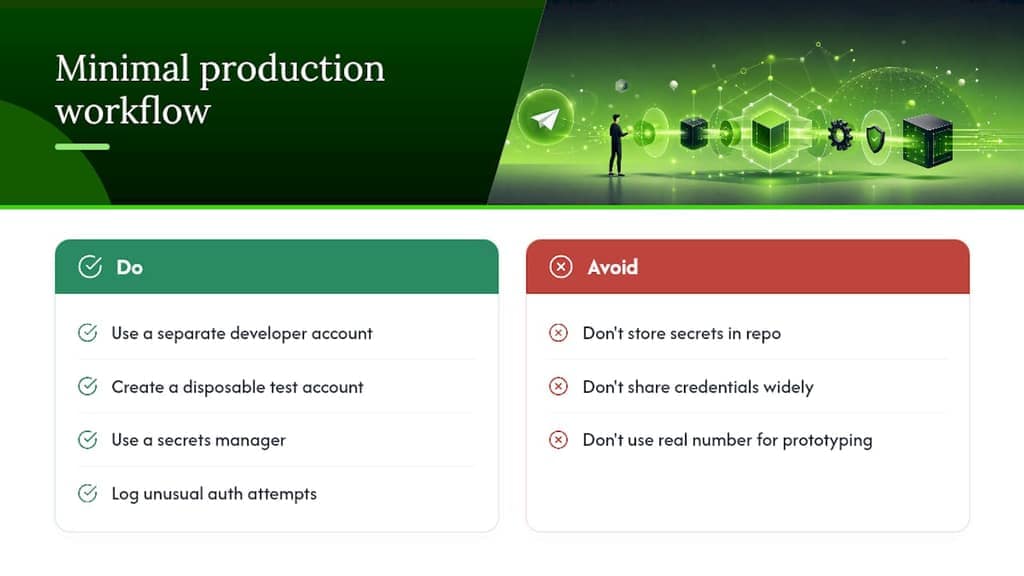
A recommended, minimal workflow for production projects
A workflow worth copying: keep a separate developer account strictly for credential registration, push secrets into a proper secrets manager rather than a .env file sitting in a repo, and limit how widely you distribute api_hash if your project is public. Log unusual authentication attempts so you notice trouble before Telegram does.
One habit pays off early: spin up a disposable test account while you're prototyping, then register a dedicated production developer account only when you're ready to ship. It keeps your real number's notification history clean and separates "still breaking things" from "this is live."
A Practical Alternative for Bulk Telegram Data Exports
Building against the API directly makes sense when you're shipping a bot or a full client application. But if your actual goal is pulling group members, chat messages, or media out of Telegram for research, lead generation, or reporting, writing and maintaining MTProto code is a lot of overhead for that one job.
Mastros takes a different route. Its Telegram scraper Chrome extension exports group members, messages, recent contacts, mutual groups, and bulk media straight from Telegram Web, running locally in your browser so nothing gets uploaded to an external server. For larger or more detailed exports, its optional Power Mode connects using your own api_id and api_hash, the exact credentials this guide just walked you through creating, giving you faster, richer data pulls without writing a custom MTProto client from scratch.

It's not a replacement for building an actual bot or app. It's the practical middle ground when the API credentials are a means to an export, not a product. Check the Mastros Telegram extension if bulk exports, not app development, are the real task on your plate.
Sources
FAQ
How do I get my Telegram API ID?
Log in to my.telegram.org with your phone number, open API development tools, and fill out the Create New Application form. Your api_id and api_hash appear immediately on submission.
How do I set up a Telegram developer account?
You don't need a separate developer account type. Any active Telegram account registered through the official app can log in to my.telegram.org and register an application to receive credentials.
How do I generate a new API ID if I lose mine?
You can't regenerate api_id or api_hash through self-service; they're tied to your developer account and app registration. If credentials are compromised, remove any public exposure and treat the phone number's account activity as compromised going forward.
Is the Telegram API free to use?
Yes. Registering at my.telegram.org and obtaining api_id and api_hash costs nothing, and the Telegram API itself is open for developers building custom clients or bots.
Do I need api_id and api_hash to build a bot?
Not necessarily. A simple bot built on the Bot API only needs a token from BotFather. You need api_id and api_hash for MTProto-based client features that the Bot API doesn't cover.
Recommended
- Telegram API Hash for Browser Exports: A Clear Guide
- Telegram API vs Browser Extension: Which Should You Use for Data Export? — Mastros Blog
- Telegram Scraper Chrome Extension — Members, Messages, Mutual Groups
- The Missing Data Source in Your GTM Stack — Why Telegram Belongs in Your Warehouse — Mastros Blog