



Local data processing means running compute where the data already sits, on a device, a server in your own rack, or an edge node, instead of shipping it to a third-party cloud first. Three reasons push technology teams toward it: regulatory sovereignty, latency, and protecting sensitive data or intellectual property from third-party exposure. You lean toward cloud instead when workloads are bursty, unpredictable, or need elastic scale that a fixed local footprint can't match cheaply.
- Compliance: keeps regulated data inside a defined jurisdiction or network boundary
- Latency: cuts round-trip time for real-time or offline-capable systems
- Privacy/IP protection: raw data never leaves your control, reducing third-party exposure
The security controls and developer tooling that make this practical get their own sections below.
Key Takeaways
Local data processing works best when latency, sovereignty, or IP protection outweigh the elastic scale that cloud infrastructure otherwise provides.
| Point | Details |
|---|---|
| Choose based on sensitivity, not habit | Map data sensitivity, latency needs, and legal constraints before picking on-prem, edge, or hybrid. |
| Metadata-first beats raw upload | Frameworks like LocalFlow send only column stats to models, keeping raw rows on your device. |
| True sovereignty is testable | Verify zero outbound connectivity directly rather than trusting a "self-hosted" label. |
| Hybrid solves the scale problem | Burst non-sensitive workloads to the cloud while sensitive data stays local. |
| Browser-local tools fit lightweight exports | Mastros processes Telegram, WhatsApp, and LinkedIn exports directly in the browser, no server upload required. |
Table of Contents
- What Local Data Processing Looks Like in Practice
- The Real Benefits and Trade-Offs of Processing Data Locally
- Choosing Between On‑Prem, Edge, and Hybrid Architectures
- Security, Governance, and Compliance Controls That Work
- Planning for Performance, Cost, and Day-to-Day Operations
- Developer Tools That Make Local-First Analytics Work
- Matching Use Cases to the Right Architecture
- Where Local Processing Hits Its Limits
- Where Local Processing Is Headed Next
- Bringing Local-First Processing Into Your Own Workflow
- Editorial Take: Why Local‑First Tooling Beats the Compliance Checklist Approach
- Sources
- FAQ
What Local Data Processing Looks Like in Practice
"Local" isn't one architecture. It's a spectrum, and where you land on it changes your tooling, your risk profile, and your ops burden.
- On-device processing runs entirely on the end-user's machine or browser. Nothing leaves the laptop or phone unless you explicitly export it.
- On-premises processing runs on hardware you own or lease inside your own network, often behind a firewall with no path to the public internet.
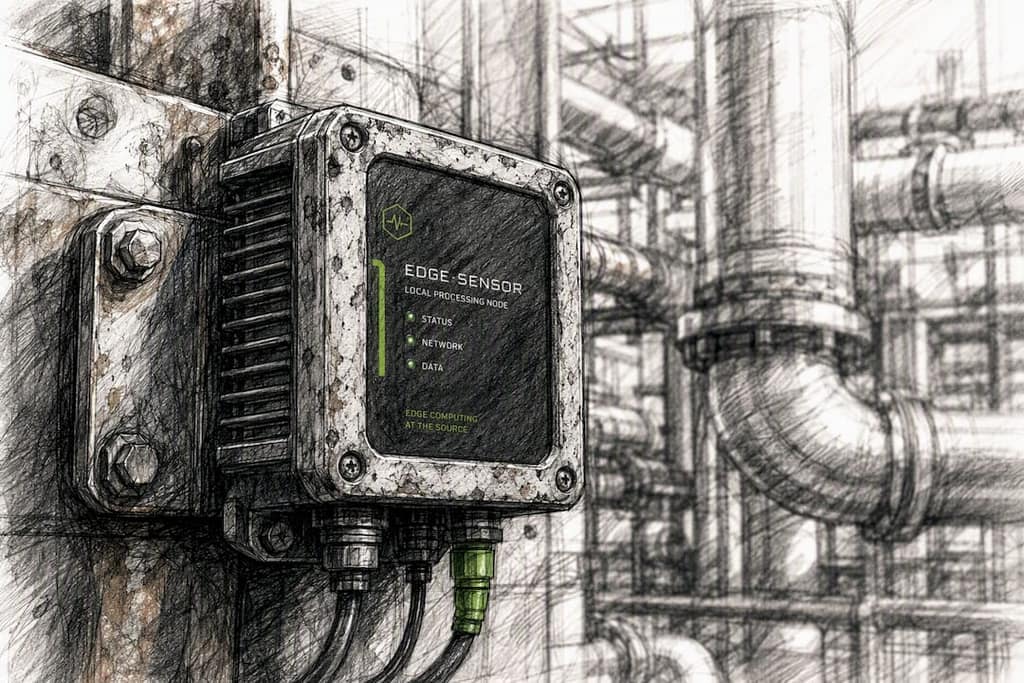
- Edge processing happens on nodes close to where data originates, a factory floor sensor hub, a retail store's local server, a 5G base station, trading milliseconds for physical proximity.
- Hybrid processing keeps sensitive work local and bursts non-sensitive work to the cloud when you need scale.
A pattern worth knowing before you pick a tool: metadata-first, sandboxed code generation. Instead of sending raw rows to a large language model, the system sends only column headers and summary statistics, then generates and runs transformation code locally on the user's machine inside a sandboxed environment. Raw data never crosses the wire. That's a meaningfully different privacy posture than a pipeline that uploads full datasets for cloud-side inference.
The Real Benefits and Trade-Offs of Processing Data Locally
Latency is the most tangible win. When processing happens a few feet from the sensor or the browser tab instead of a data center three regions away, round-trip time drops from hundreds of milliseconds to single digits, which matters for anything real-time: fraud detection, industrial control loops, live chat exports.
Sovereignty and compliance follow close behind. Organizations increasingly choose on-premises data processing specifically to retain regulatory control, protect proprietary datasets, and guarantee low latency for mission-critical workloads, rather than trusting a vendor's shared infrastructure to enforce those boundaries for them.
- Reduced blast radius if a third-party vendor gets breached
- No dependency on external API uptime for core functions
- Full audit visibility into where data physically sits
Statistic to weigh: the trade-off shows up in cost predictability, not headline savings. Local infrastructure trades variable cloud billing for fixed capital and staffing costs, which is a win for steady, predictable workloads and a drag for spiky ones. Collaboration across distributed teams also gets harder locally: sharing a local dataset across five offices takes real network engineering that a shared cloud bucket solves for free.
Choosing Between On‑Prem, Edge, and Hybrid Architectures
Your architecture choice should follow your data's sensitivity and your workload's shape, not the other way around.
On-premises and air-gapped setups fit organizations with strict sovereignty rules: financial institutions, defense contractors, hospitals. These typically run on single-tenant appliances with no route to the public internet at all, the strongest sovereignty signal available. Hardware costs are real and upfront, but so is the control.
Edge nodes make sense for IoT and telemetry workloads where the data source is physically distributed: manufacturing sensors, connected vehicles, retail point-of-sale systems. Processing happens on colocated hardware near the source, then only aggregated results travel upstream.
Hybrid patterns solve the problem neither pure model handles well. Sensitive records stay local while non-sensitive batch jobs burst to the public cloud for elastic scale. Bring-your-own-key (BYOK) encryption and proxy patterns let you route only the safe subset of a task to a remote model or service.
- On-prem/air-gapped: maximum control, highest fixed cost
- Edge: low latency, distributed hardware management overhead
- Hybrid: flexible scale, requires careful data classification upfront
Pro Tip: Before choosing hybrid, map every field in your dataset to a sensitivity tier. Teams that skip this step usually end up sending something regulated to the cloud "temporarily," and temporarily becomes permanent.
Security, Governance, and Compliance Controls That Work
Running data locally doesn't automatically make it secure. It just removes one attack surface, the network hop to a third-party server, while leaving everything else up to you.
Encryption still matters most. BYOK setups paired with hardware-backed keys and a proper key management system (KMS) mean that even someone with physical access to a drive can't read the data without the key. Pair that with data cataloging and automated PII detection so you actually know what's in your local datasets before an auditor asks.
- Encrypt data at rest with hardware-backed keys, not just software defaults
- Maintain a live catalog tagging which fields count as PII or regulated data
- Log every access event to build an audit trail regulators can inspect
- Test for zero outbound connectivity, don't just assume it
That last point deserves emphasis. A large share of vendors marketed as "self-hosted" still phone home with outbound telemetry, which undercuts the whole sovereignty argument. True air-gapped operation means the system functions with zero outbound network calls, a testable, auditable claim, not a marketing label.
Governance gets easier with a medallion architecture (Bronze, Silver, Gold layers), which supports decentralized governance by letting individual teams test models locally on raw Bronze data while central IT reviews and enforces controls before anything reaches production Gold tables through pull requests and automated checks.
Planning for Performance, Cost, and Day-to-Day Operations
Local infrastructure trades variable cloud billing for fixed capital expenditure, predictable in budget terms, less forgiving when demand spikes unexpectedly. Here's how experienced teams sequence the planning:
- Set latency budgets first. Define the maximum acceptable delay per workload before choosing hardware, not after.
- Model Capex against Opex honestly. A three-year hardware refresh cycle often beats cloud billing for steady-state workloads, but rarely for unpredictable ones.
- Plan data lifecycle up front. Decide retention windows, backup cadence, and whether older data eventually migrates to cold cloud storage.
- Build monitoring for distributed nodes. A single edge server going dark needs the same incident response rigor as a cloud region outage, arguably more, since nobody else is watching it for you.
Observability across scattered local nodes is the piece teams underestimate most. Centralized cloud logging is a checkbox; distributed local logging is an actual engineering project.
Developer Tools That Make Local-First Analytics Work
The tooling landscape has matured well past "run a script on your laptop." A few names are worth knowing.
LocalFlow implements the metadata-first protocol directly: only column names and statistics reach the LLM, while the generated transformation code executes locally inside a sandboxed iframe. A production-grade version of this stack also needs session management, API governance, and rate limiting, features that separate a real local-first platform from a quick weekend script.
Nile and Datakit take a related approach, enabling SQL and AI-assisted analysis directly in the browser or in local containers without uploading raw data anywhere.
Mastros applies the same philosophy to a narrower, high-demand problem: exporting Telegram, WhatsApp, LinkedIn, Instagram and TikTok data. Its Chrome extensions process data inside the browser itself, turning what you can already see into structured CSV, JSON, or JSONL files without routing raw chat content through an external server. The extensions are read-only and need no API credentials: they work through the session you are already signed into.
- Browser-local tools: best for one-off exports and lightweight research
- Containerized local services: best for repeatable team pipelines
- Full on-prem: best when regulation demands it
The real test of "local" isn't where the marketing says your data lives. It's whether the system still works with the network cable pulled out.
Pro Tip: Ask any local-first vendor to demonstrate their tool running with no internet connection at all. If it breaks, "local" was aspirational.
Matching Use Cases to the Right Architecture
- Regulated industries (healthcare, finance, defense) default to on-prem or air-gapped setups where sovereignty is non-negotiable.
- Real-time edge scenarios (manufacturing sensors, connected vehicles) need edge nodes physically close to the data source.
- Privacy-first research and lead generation, exporting LinkedIn search results or Telegram group members for analysis, works well with browser-local extraction, no server round trip required.
- Air-gapped analytics for classified or highly sensitive data demands zero outbound connectivity by design, not by policy.
Before committing, run through five questions: How sensitive is the data? What's the latency requirement? What scale do you need in twelve months? How mature is your ops team? What do local laws actually require?
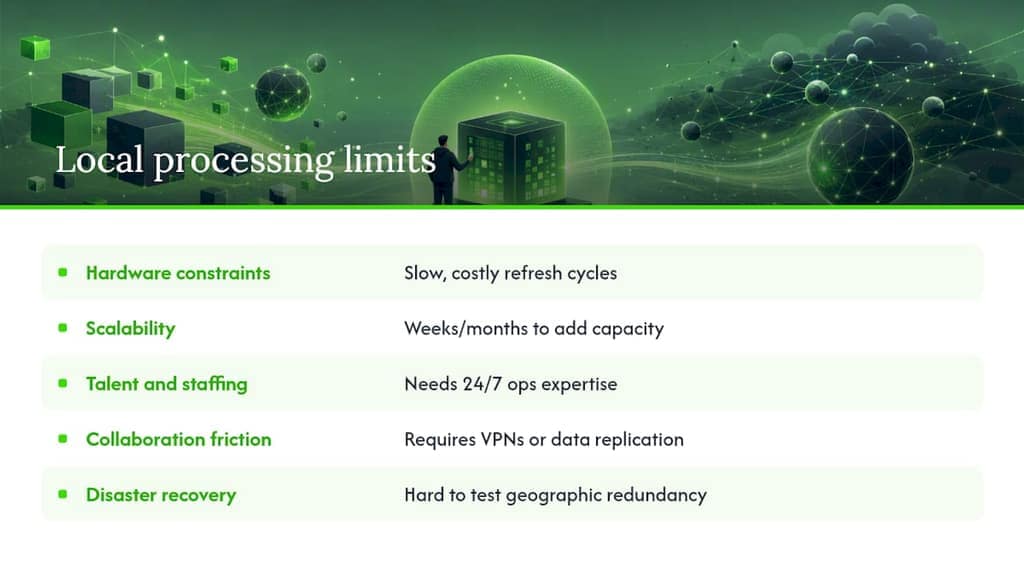
Where Local Processing Hits Its Limits
Local data processing isn't free of friction, and pretending otherwise sets teams up for a rough second year.
Hardware constraints are the first wall teams hit. A GPU cluster that handles today's model training job becomes undersized in eighteen months, and unlike cloud capacity, you can't just requisition more compute for an afternoon. Refresh cycles are slow and capital-intensive, which is fine for predictable workloads and painful for anything growing faster than forecast.
Scalability is the second. Cloud platforms scale horizontally by adding rented capacity in minutes. Local systems scale by procuring, racking, and configuring physical hardware, a process measured in weeks or months, not minutes. Edge deployments compound this: a fleet of a thousand sensor nodes means a thousand places where firmware can drift out of date.
Talent and staffing get overlooked constantly. Running your own infrastructure means you need people who can patch, monitor, and troubleshoot it at 2 a.m., not a support ticket to a cloud vendor. Smaller teams often underestimate this operational tax until an outage exposes it.
Collaboration friction shows up when distributed teams need to share local datasets across offices or regions. Cloud storage solves this with a shared bucket and an access control list. Local architectures need actual network engineering, VPNs, replication jobs, or physical data transfer, to achieve the same result.
Disaster recovery is harder to test convincingly on a single site. A fire, flood, or hardware failure at one location can take down your only copy of critical data unless you've built and tested real geographic redundancy, which most local deployments skip until it's too late.
Where Local Processing Is Headed Next
AI on the edge is the clearest trend reshaping this space. Model quantization and distillation now let genuinely useful inference run on modest local hardware, a security camera doing object detection on-device, a factory sensor flagging anomalies without a round trip to any server. That shrinks the latency and bandwidth case for cloud inference in a growing number of workloads.
Hardware acceleration is catching up fast too. Purpose-built local AI accelerators, embedded in laptops, phones, and edge appliances, are closing the performance gap with cloud GPUs for inference tasks, even as training still largely stays centralized. Expect that gap to keep narrowing for smaller and mid-sized models over the next few years.
Unified local platforms are the third shift worth tracking. Rather than stitching together separate warehousing, analytics, and AI tools, newer platforms combine all three so sensitive data stays on-prem by default while non-sensitive workloads still get to use cloud elasticity for bursts. That's the hybrid pattern from earlier in this piece, but increasingly built into a single product rather than stitched together by an integration team.
The metadata-first, sandboxed execution pattern is also likely to spread beyond niche local-first tools into mainstream analytics platforms, simply because it solves a problem, sending raw sensitive rows to an LLM, that more compliance teams are starting to ask about directly.
Bringing Local-First Processing Into Your Own Workflow
If you manage Telegram groups, WhatsApp communities, or LinkedIn outreach and need bulk exports for lead generation, recruitment, or research, sending that raw contact and message data to a third-party server for "processing" is exactly the exposure this entire architecture pattern exists to avoid.
Mastros builds its Chrome extensions around that principle directly. The Telegram scraper pulls group members, chat messages, mutual groups, and bulk media straight from Telegram Web, processing everything in your browser before it ever becomes a CSV, Excel, JSON, or JSONL file. The WhatsApp scraper runs the same read-only, in-browser model with no API access and no message automation. Both extensions offer a free tier to test the export quality on your own data before committing to a paid plan with higher volume quotas.
If your workflow spans multiple platforms, the broader Mastros toolkit also covers LinkedIn and Sales Navigator exports, turning visible search results and lead lists into structured files ready for a CRM import, all without a raw data upload leaving your browser tab.
Editorial Take: Why Local‑First Tooling Beats the Compliance Checklist Approach
Most guidance on this topic treats local processing as a compliance checkbox: pick on-prem because a regulation says so, then move on. That framing misses the more interesting shift happening in the tooling itself. The metadata-first pattern that LocalFlow and similar frameworks use isn't just a privacy feature bolted onto existing analytics, it's a genuinely different way of doing the analysis, where the model never sees your rows at all, only their shape.
That distinction matters more than the sovereignty argument most vendors lead with. A system that sends column statistics instead of raw data to a remote model isn't just safer, it's often more repeatable, since generated code that runs locally produces deterministic results you can rerun and audit, unlike a black-box cloud inference call.
The practical lesson for decision-makers: don't ask "cloud or local" as a binary. Ask which specific fields in your pipeline actually need to touch a remote system at all, then architect for that boundary. Most teams find the answer is far fewer fields than they assumed.
Sources
- Local data processing on your machine — Lapu AI
- On-premises data — Actian
- How to build a modern on-premise data lakehouse — DEV Community
FAQ
What Are Some Examples of Local Data Processing?
Common examples include on-device photo editing, browser-based chat exports like those Mastros produces, factory sensor analytics run on edge nodes, and hospital record systems running entirely on-prem for compliance.
What Does "Local" Mean in Data Processing?
Local means the compute happens on hardware you control, physically, whether that's an end-user device, an on-premises server, or an edge node, rather than on a third-party cloud provider's infrastructure.
What Are the Main Types of Data Processing Architectures?
The four common patterns are on-device, on-premises, edge, and hybrid, each trading off control, latency, and scalability differently depending on where the compute actually runs.
What Does Data Processing Mean in This Context?
It refers to transforming raw data, cleaning it, analyzing it, generating insights, into usable output, with "local" specifying that this transformation happens near or on the data's origin instead of a remote cloud server.
When Should I Choose Cloud Processing Instead of Local?
Choose cloud processing when workloads are unpredictable or bursty and need elastic scale, since fixed local infrastructure struggles to match cloud's on-demand capacity economically.