


The fastest, safest way to export LinkedIn companies is through the official Page admin export or LinkedIn's Pages Data Portability API if you manage or build for that Page. If you need scale, automation, or you want to keep everything off third-party servers, a scheduled connector or a privacy-first browser extension fills the gap. On the extension side, Mastros lets you export LinkedIn search results to Excel or CSV, company results included, read-only.
- One-off report or small list: use the Page admin UI export.
- Recurring pulls or CRM sync: use a connector, script, or a browser extension with scheduling.
Any export touching follower or employee data should respect the Page admin permission requirement and stay mindful of GDPR and CPRA rules around storing personal data.
Pro Tip: Start with a small test export (25 to 50 rows) before you commit to a full company list. It catches formatting problems before they hit your CRM.
Key Takeaways
Exporting LinkedIn companies successfully depends on matching your access level and privacy needs to the right method: admin export for one-off pulls, API or connectors for automation, and local extensions when data sensitivity is the priority.
| Point | Details |
|---|---|
| Match method to access | Use the Page admin UI export if you have admin rights and just need a report. |
| Automate with care | Connectors and APIs enable scheduling but require rate-limit and concurrency management. |
| Verify company slugs | Deduplicate and confirm vanity slugs before bulk exports, since display names repeat but slugs don't. |
| Expect some gaps | Fields like founded date or specialties are often null even in solid export tools. |
| Choose privacy-first when it matters | Mastros processes LinkedIn company, people, and Sales Navigator exports locally in the browser, with no server upload required. |
Table of Contents
- What Data Can You Export From a LinkedIn Company Page?
- How Do You Export LinkedIn Company Data Officially?
- What Third-Party Tools Help Automate LinkedIn Exports?
- Are Browser Extensions a Privacy-First Way to Export Companies?
- How Do You Export LinkedIn Company Followers to CSV?
- How Do You Set Up Recurring LinkedIn Exports?
- What Permissions and Compliance Rules Apply to LinkedIn Exports?
- What Matters When Choosing an Export Method
- Export LinkedIn Companies Without Sending Data Anywhere Else
- Sources
- FAQ
What Data Can You Export From a LinkedIn Company Page?
A LinkedIn Company Page gives up more than a follower count if you know where to look. Page admins can pull follower totals and, in some export flows, follower lists; basic firmographics like employee_count, industry, and headquarters; page-level metrics such as views and engagements; and post and comment analytics rows. When employee profile data is public, some fields carry over too.
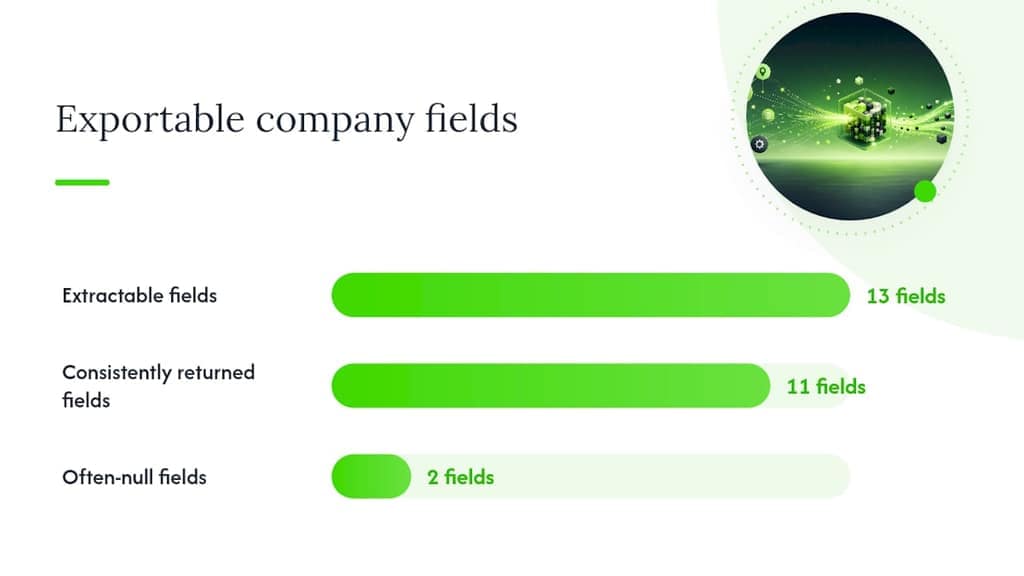
Third-party parsing tools illustrate the ceiling here. The ChocoData linkedin-company-scraper repository extracts 13 distinct company fields, including followers and employee_count, straight from the page's public JSON-LD block, no headless browser needed. But not every field is reliable: in the same tool's sampled runs, most pages return 11 of those 13 fields consistently, while entries like founded date or specialties often come back null.
Export formats break down predictably:
- CSV for CRM imports and spreadsheet work.
- XLSX when you need formatting, formulas, or multiple sheets.
- JSON/JSONL for programmatic ingestion into a database or AI pipeline.
How Do You Export LinkedIn Company Data Officially?
LinkedIn gives Page owners and authorized developers two sanctioned paths, and both start with the same requirement: you need Page admin access or an approved developer role tied to that Page, according to LinkedIn's own documentation.
Page admin UI export steps:
- Log in as an admin and open your Page's Analytics tab.
- Choose the data view: Visitors, Followers, Leads, or Content.
- Set the date range you want covered.
- Click Export and select your file format (typically XLS/CSV).
- Save the file and confirm row counts before you use it downstream.
The Pages Data Portability API is the programmatic route. It requires registered developer credentials and Page-level authorization, and it's built for recurring, automated pulls rather than a single download. Some company data APIs recommend batching requests, capping lists around 200 URLs per call and limiting concurrency to avoid failed requests.
- Prefer the UI export for a quarterly report.
- Prefer the API for anything you plan to refresh weekly or more often.
What Third-Party Tools Help Automate LinkedIn Exports?
No-code connectors exist specifically to close the gap between LinkedIn's raw analytics and the dashboard or spreadsheet your team actually looks at. Tools like Coupler.io walk through connecting a LinkedIn Page account, selecting a report type, and pushing the output straight to Google Sheets, Excel, or a BI tool on a set schedule. Evaboot and similar connector-style tools follow a comparable setup pattern: connect, select, map, schedule.
When you're comparing options, weigh them on:
- Data types supported (followers, employees, metrics, posts).
- Setup complexity (no-code connector vs. script vs. API).
- Scheduling and automation depth.
- Whether it needs your login credentials or API keys.
- Output destination and file formats.
- Pricing shape: freemium tiers usually cap export volume and refresh frequency, while paid plans unlock more of both.
Tools built for scale, like Apify's LinkedIn company scraper Actor, add proxy and session management so you can run large batches without getting blocked mid-export.
Pro Tip: Use a connector when you want speed and a dashboard by end of day. Reach for an API script or Actor when you need control over pagination, retries, or a warehouse destination.
Are Browser Extensions a Privacy-First Way to Export Companies?
Yes, and they solve a specific problem: getting structured data out without sending anything to a server you don't control. A privacy-first browser extension runs inside your own Chrome session, reads what's already visible on the page, and writes the export file locally.

That local-processing model matters more than it sounds. LinkedIn's public company pages already expose a schema.org Organization block that can be parsed without JavaScript rendering, which is why lightweight, browser-based extraction tends to return reliable follower counts and firmographic basics without heavy infrastructure.
Look for these signals before trusting one:
- An explicit local-only processing claim, not just a privacy policy that mentions it in passing.
- Clear, published quotas and pricing (not "contact sales" pricing for a browser tool).
- Support for people, companies, jobs, and Sales Navigator exports, not just one data type.
- Output in CSV, Excel, or JSON/JSONL depending on your workflow.
This fits one-off firmographic pulls, small lead lists for outbound, and any workflow where a compliance team would ask "where did this data get uploaded" and you want the honest answer to be "nowhere."
Pro Tip: If your company or client contract restricts sending prospect data to third-party servers, a browser extension often clears that bar automatically, since nothing leaves the machine.
How Do You Export LinkedIn Company Followers to CSV?
This is the workflow most Page owners actually need on a Tuesday afternoon.
- Confirm you have Page admin access. Without it, the export button won't appear.
- Open Page Analytics and click into the Followers tab.
- Set your date range. Choose "All time" for a full baseline, or a recent window for growth tracking.
- Click Export and select CSV or XLSX.
- Open the file and check the header row before you import it anywhere else.
Before that file goes into a CRM, run a quick cleanup pass:
- Confirm the Page's vanity slug matches the account you meant to export, since display names aren't unique but slugs are.
- Deduplicate any repeated slugs across multiple exports.
- Keep a consistent column set: name, role, company, follower_count, profile_url.
If the exported list is thin on detail, that's normal. Follow up with a firmographic enrichment pass rather than assuming the first export failed.
How Do You Set Up Recurring LinkedIn Exports?
Automation turns a one-time export into a living data feed. The setup pattern is consistent whether you're using a connector or a custom script.
- Connect your LinkedIn or Page admin account to the tool.
- Choose the report or data type (followers, page metrics, company list).
- Map fields to your destination format.
- Set a refresh schedule.
- Run one test cycle before turning on full automation.
Common destinations include Google Sheets, Microsoft Excel, Looker Studio or another BI tool, and data warehouses like BigQuery, Postgres, or Redshift when you're feeding dashboards instead of spreadsheets. Direct-to-BI connectors cut down on the manual ETL work teams otherwise do by hand.
- Daily refresh: fast-moving campaign pages.
- Weekly refresh: steady brand monitoring.
- Hourly refresh: only for high-velocity ad reporting, and only if your connector supports it.
Watch for auth token expiration and API rate limits, and cap batch size and concurrency rather than firing every request at once.
What Permissions and Compliance Rules Apply to LinkedIn Exports?
Stick to Page admin-approved exports or authorized developer API access. Don't scrape member-only profile details en masse without a legitimate, permissioned reason, since that crosses from "exporting your own Page data" into territory LinkedIn's terms of service don't cover.
- Do use the official export or API when you have admin rights.
- Do minimize the personal data you store, and secure it in transit and at rest.
- Don't treat scraping public pages at scale as risk-free just because the data is visible.
- Don't skip a privacy review if you're exporting EU or California residents' data, given GDPR and CPRA obligations.
Pro Tip: Keep a simple audit log of what you exported, when, and why. It's a five-minute habit that saves a painful conversation if a compliance question ever comes up.
Local-processing tools help here too, since data that never leaves your browser is simpler to reason about from a privacy standpoint than a file sitting on someone else's server.
What Matters When Choosing an Export Method
Most guides treat every export method as interchangeable, and that's the wrong frame. The real question is where your bottleneck sits: permission, scale, or trust.
If you have admin access and just need a report, the official export wins every time, no debate. Once you need automation across dozens of pages, I lean toward pairing an API or Actor with a data warehouse, because dashboards should update themselves. But the moment prospect or employee data is sensitive, or a client contract restricts third-party uploads, a local browser extension is the more defensible call, even if it's slower than a cloud pipeline.
Export LinkedIn Companies Without Sending Data Anywhere Else
Mastros gives you a route the connectors and scrapers above can't match on one specific point: nothing you export ever leaves your browser. The LinkedIn exporter pulls people, companies, jobs, post search results, and Sales Navigator leads and accounts directly from what's already on your screen, and writes it out as CSV, Excel, or JSON/JSONL depending on what your CRM or spreadsheet needs.
There's a free plan to test the workflow on a real company list before you decide on a paid tier for higher export volume. If a compliance team or client contract has ever made you second-guess a scraping tool, this is the answer to "does the data leave the building": it doesn't. Start with the LinkedIn exporter page and run your first export today.
Sources
FAQ
Is there a way to export all my LinkedIn connections?
Yes, LinkedIn lets you request an export of your own connections through account settings, separate from Page-level company exports covered here. That personal data request is different from exporting a Company Page's follower list, which requires Page admin access.
Is LinkedIn scraping allowed?
LinkedIn's terms restrict automated scraping of member profile data outside of authorized access. Public company page fields parsed through documented methods, like schema.org JSON-LD blocks, carry lower risk than scraping gated or member-only content at scale.
What is the 4-1-1 rule on LinkedIn?
It's a content-sharing guideline, not an export rule: for every four pieces of content you share from others, post one piece of your own thought leadership and one promotional post. It has no bearing on how you export company or follower data.
Is there a way to export your entire LinkedIn profile?
LinkedIn's account settings include a personal data download option covering your own profile, but this is distinct from a Company Page export. For company-level data such as followers or employee counts, use the Page admin export or a tool like the Mastros exporter instead.