



TL;DR:
- Mastros is a privacy-first LinkedIn data exporter that processes information locally without cloud storage. It supports exporting people, companies, jobs, and Sales Navigator leads in multiple formats, including JSONL. Using these tools helps researchers and recruiters avoid account risk by keeping data on their device and exporting at a safe pace.
If you need structured lead lists from LinkedIn without outreach automation, Mastros is the leading privacy-first choice. It exports people, companies, jobs, and Sales Navigator leads directly from your browser into CSV, JSON, or JSONL, with no backend server involved. Local-first tools keep your data on your device and remove third-party storage risk entirely. With Mastros you can export LinkedIn search results to Excel or CSV, and it stays read-only.
TL;DR:
- Privacy model: All four tools covered here process data locally in your browser. No cloud upload, no backend.
- Supported data: People search, companies, jobs, Sales Navigator leads (Mastros covers all; others vary).
- Best for: Recruiting pipelines, lead gen, CRM imports, and research. Not for connection requests or messaging.
- Account risk: All browser exporters carry some LinkedIn detection risk. Export at a measured pace and keep outreach in a separate tool.
Table of Contents
- What are the best privacy-first Dux-Soup alternatives?
- How to choose the right LinkedIn exporter for lead gen and recruiting
- How to run your first export with Mastros in under two minutes
- Privacy, security, and LinkedIn policy: what you must know
- What do browser export tools typically cost?
- When an exporter is the wrong tool
- Key Takeaways
- Why local-first exporters are the right call right now
- Useful sources, docs, and changelogs for verification
- FAQ
What are the best privacy-first Dux-Soup alternatives?
These four extensions are the SERP consensus picks for local LinkedIn data exports. None of them automate outreach.
| Feature | Mastros | LinkedIn → CSV Exporter | LinkedIn People Extractor | SalesNav Exporter |
|---|---|---|---|---|
| Data exported | People, companies, jobs, posts, Sales Navigator leads & accounts | People search only | People search | Sales Navigator leads |
| Privacy model | Local/browser-only | Local/browser-only | Local/browser-only | Local/browser-only |
| Supported LinkedIn pages | Search, Sales Navigator, Recruiter, Jobs, Posts | People search | People search | Sales Navigator only |
| File formats | CSV, Excel, JSON, JSONL | CSV | CSV | CSV |
| Multi-page / bulk export | Yes, with deduplication | Pro: multi-page export | Limited | Limited |
| Pricing model | Free + subscription | Free + one-time Pro | Free + paid tier | Free + paid tier |
| Browser compatibility | Chrome, Edge | Chrome | Chrome | Chrome |
| Extras | Telegram & WhatsApp exports, Power/API mode | None | None | None |
Mastros ✅ Recommended
- Covers the widest range of LinkedIn pages and data types
- Exports to four formats, including JSONL for programmatic CRM imports
- Extends to Telegram and WhatsApp exports if your prospecting spans messaging platforms
- Free plan available; subscription unlocks higher monthly export volume
LinkedIn → CSV Exporter
- Solid for simple people-search exports; the Chrome Web Store listing shows a clear changelog, which is a good trust signal
- One-time Pro purchase (no recurring fee) unlocks a multi-page export limit per session
- Fields are limited to name, title, company, location, and profile link; no Sales Navigator support
LinkedIn People Extractor (CSV)
- Handles people-search pages only; no company, job, or Sales Navigator exports
- Useful for one-off research pulls where you only need basic contact fields
SalesNav Exporter
- Focused exclusively on Sales Navigator leads; the right call if that is your only source
- No support for standard LinkedIn search, jobs, or company pages
How to choose the right LinkedIn exporter for lead gen and recruiting
The wrong extension can expose your data to a third-party server or break silently after a LinkedIn layout update. Run through this checklist before installing anything.
Evaluation checklist:
- Privacy model — Does the extension state explicitly that processing is local-only? Check the privacy policy, not just the marketing copy.
- Export fields — Confirm it exports the specific fields your CRM import template requires (name, title, company, email if available, profile URL).
- Supported LinkedIn pages — Standard search, Sales Navigator, Recruiter, and Jobs pages each have different DOM structures. Verify the extension supports your actual workflow.
- Formats and deduplication — CSV works for most CRMs; JSONL is better for programmatic pipelines. Deduplication prevents duplicate records when you export overlapping page ranges.
- CRM integrations — Most exporters produce flat files. Check whether your CRM (HubSpot, Salesforce, Pipedrive) accepts CSV or requires a specific column mapping.
- Maintenance cadence — LinkedIn changes its layout regularly. A changelog with recent commits is the clearest sign the developer is keeping up. No changelog is a red flag.
- Permissions on install — An exporter needs access to LinkedIn pages. It does not need access to all your browsing history or your clipboard. Broad, unrelated permissions are a warning sign.
- Pricing and true limits — "Free" often means one page per export. Know the per-export page cap and the monthly quota before committing.
Red flags to avoid:
- Extensions that send data to a remote server during export
- Permissions requests for sites unrelated to LinkedIn
- No version history or last-updated date in the Chrome Web Store listing
- Ambiguous billing with no clear free-tier limit stated upfront
For teams, CSV is usually the safest shared format. If you are building an automated pipeline, JSONL gives you structured records that import cleanly without manual column mapping.
How to run your first export with Mastros in under two minutes
Good news: the first export takes about 60 seconds once the extension is installed.
- Install the Mastros LinkedIn exporter from the Chrome Web Store and pin it to your toolbar.
- Log in to LinkedIn in the same browser window.
- Run a LinkedIn people search with your target filters (title, location, industry).
- Click the Mastros icon in your toolbar and select the export type (People).
- Choose your page range and file format (CSV for most CRM imports).
- Click Export and download the file when it appears.
Pro Tip: Run a single-page export first to confirm the column headers match your CRM import template before pulling 10+ pages. Fixing a column mismatch on 50 rows is much faster than on 500.
Common issues and fixes:
- Zero results after a LinkedIn update: LinkedIn occasionally changes its page structure. Check the extension's changelog for a recent fix; if none exists, the extension may be abandoned.
- Permission warning on install: Expected for LinkedIn-page access. If the warning covers unrelated sites, reconsider installing.
- Export runs but file is empty: You may be on a LinkedIn page the extension does not support (e.g., a Recruiter Lite page vs. a standard search). Switch to a supported page type and retry.
Privacy, security, and LinkedIn policy: what you must know
The safest model is local/browser-only processing with no backend storage. When an extension processes data entirely inside your browser tab, your lead list never touches a third-party server.
The practical rule: If an extension's privacy policy mentions uploading, syncing, or storing your exported data on its servers, your lead list is no longer yours alone. Local-only tools avoid that exposure entirely. Privacy-first design patterns — minimal permissions, optional advanced features, and explicit onboarding consent — are the clearest signals that a developer takes this seriously.
Privacy checklist for any extension you install:
- Requests only the permissions it needs (LinkedIn pages, not all-sites access)
- Posts a clear privacy policy explaining data collection, use, and sharing, as required by Chrome Web Store policy
- Uses optional permissions for advanced features rather than requesting everything upfront
- Follows opt-in consent flows for any personally identifying data it collects about you
- Provides export and deletion controls for any locally stored data, per current best practices
Reducing LinkedIn account risk:
- Throttle your export speed; do not pull hundreds of pages in a single session
- Never use the same extension for both exporting and outreach automation
- Run exports from accounts that can tolerate some detection risk if your primary account is critical
- Read-only export tools (no messaging, no connection requests) carry lower risk than automation tools
What do browser export tools typically cost?
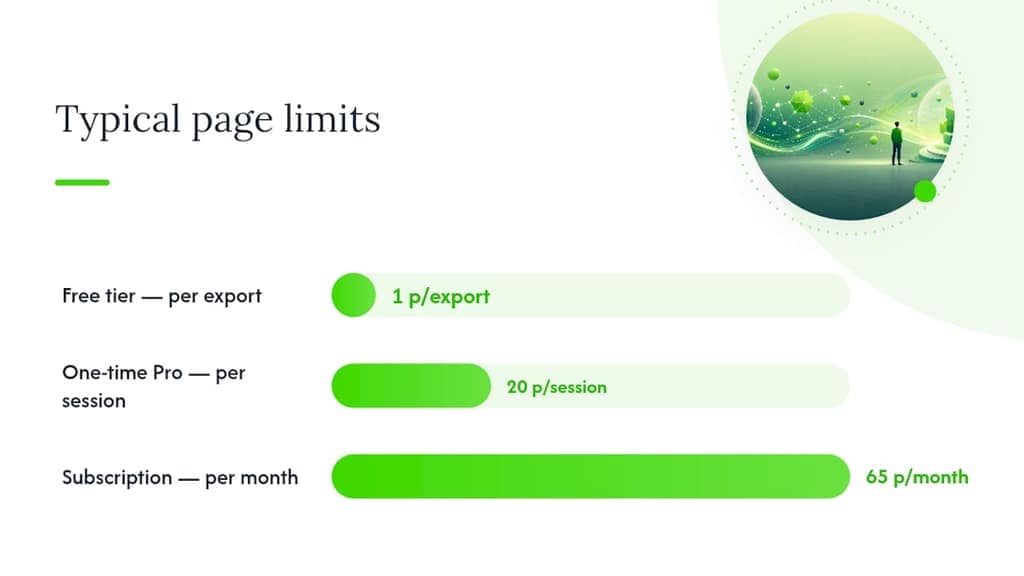
Pricing across this category follows three patterns: free tiers with page caps, one-time Pro purchases, and monthly subscriptions with export quotas.
| Pricing model | What you get | Typical limit |
|---|---|---|
| Free tier | Single-page exports, basic fields | 1 page per export |
| One-time Pro | Multi-page export unlocked (LinkedIn → CSV Exporter supports up to 20 pages per export session) | Up to 20 pages per export session |
| Monthly subscription | Higher monthly export volume, more data types | Varies by plan |
Estimating your monthly budget:
A typical LinkedIn people-search page returns several results per page. If you need a few hundred leads per month, that requires exporting multiple pages. Factor in some deduplication overhead when page ranges overlap. A subscription plan that covers 60–70 pages per month usually handles that comfortably for most lead gen workflows.
Operational limits that matter most:
- Per-export page cap (how many pages in one session)
- Monthly quota reset date and rollover policy
- Support responsiveness when LinkedIn layout changes break the extension
When an exporter is the wrong tool
Browser exporters are not the right fit for every workflow. Know when to reach for something else.
Skip the exporter when:
- You need verified email addresses or phone numbers. Exporters pull visible LinkedIn fields only; enrichment requires a separate data provider.
- Your workflow requires automated connection requests or message sequences. That is a different tool category entirely, and mixing it with an exporter in the same extension increases account risk.
- Your account cannot absorb any detection risk. If losing LinkedIn access would halt your business, manual collection or native exports are safer.
Alternatives worth knowing:
- Sales Navigator native CRM sync — available on certain Sales Navigator plans, this is the only LinkedIn-native export path and carries no third-party risk. Check your plan's eligibility before paying for a third-party tool.
- Official LinkedIn APIs — for high-volume institutional data needs, the LinkedIn Marketing API or Recruiter API provides rate guarantees and SLA coverage, though access requires approval and developer setup.
- Manual collection — for one-off research pulls of fewer than 50 records, copy-paste into a spreadsheet is faster than installing and configuring an extension.
When your volume grows past what a browser extension handles cleanly, or when you need verified contact data, the practical comparison between LinkedIn and messaging-app prospecting can help you decide where to invest next.
Key Takeaways
Mastros is the strongest privacy-first LinkedIn exporter for teams that need local CSV/JSON exports across people, companies, jobs, and Sales Navigator leads without any outreach automation.
| Point | Details |
|---|---|
| Start with Mastros | It covers the widest range of LinkedIn pages and export formats, including Sales Navigator and JSONL. |
| Validate with one page first | Run a single-page export to confirm column headers match your CRM before scaling to bulk pulls. |
| Keep export and outreach separate | Never use the same extension for data export and connection requests; it raises account risk significantly. |
| Check the changelog | A maintained version history is the clearest sign an extension survives LinkedIn layout changes. |
| Mastros extends beyond LinkedIn | If your prospecting includes Telegram or WhatsApp groups, Mastros covers those exports too. |
Why local-first exporters are the right call right now
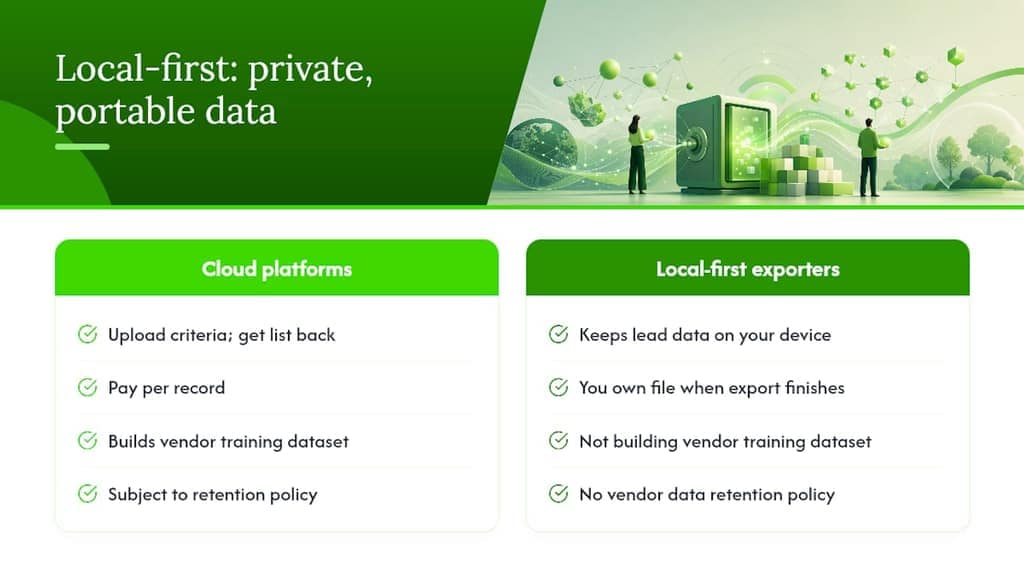
The conventional wisdom in lead gen still leans toward cloud platforms: upload your criteria, get a list back, pay per record. That model made sense when browser extensions were unreliable. It makes less sense now.
Local-first architecture keeps your lead data on your device. You are not building someone else's training dataset or accepting their data retention policy. You own the file the moment the export finishes. Switch tools tomorrow and your historical records go with you, because they live in a folder on your machine, not in a vendor's database.
The teams I see get the most out of these tools treat the export as a structured research step, not a shortcut to mass outreach. They pull a clean CSV, map it to their CRM, and then engage manually or through a dedicated outreach tool. That separation is what keeps accounts safe and data quality high. The export-to-CRM workflow is straightforward when the file format is right from the start.
Useful sources, docs, and changelogs for verification
- LinkedIn → CSV Exporter — Chrome Web Store
- Protect user privacy — Chrome Extensions developer docs
- Best practices for collecting user data consents — Mozilla Extension Workshop (GitHub)
- Export LinkedIn Search Results to Excel: Complete Guide
- Privacy-First Design Patterns for Chrome Extensions: Build Trust and Pass Review | ExtensionBooster
- Why I’m Betting on Local-First Architecture for Lead Gen (Meet Scrylo) — DEV Community
- Privacy-First Chrome Extension Development Guide: Protecting User Data in 2025 | Best Chrome Extensions Guide
FAQ
What makes a LinkedIn exporter "privacy-first"?
A privacy-first exporter processes and writes data entirely inside your browser with no backend server. Your exported CSV or JSON file is created locally and never uploaded to a third-party database.
Does Mastros support Sales Navigator exports?
Yes. Mastros exports both Sales Navigator leads and accounts, in addition to standard LinkedIn people search, company search, job listings, and post results.
Are browser-based LinkedIn exporters against LinkedIn's terms of service?
Extension-based exporters carry account risk and operate in a gray area of LinkedIn's terms. Export at a measured pace, avoid automation, and keep outreach in a separate tool to reduce detection risk.
What file format should I use for CRM imports?
CSV works for most CRMs including HubSpot, Salesforce, and Pipedrive. Use JSONL if your pipeline is programmatic and requires structured records without manual column mapping.
How do I know if an extension is still maintained?
Check the Chrome Web Store listing for an active version history or changelog. Extensions that document fixes for LinkedIn DOM changes are actively maintained; those without recent updates may be unreliable.