



The single most important rule: use a privacy-first, read-only WhatsApp export tool or the official WhatsApp Business API, message only opt-in contacts, and pace everything. Do those three things and you eliminate the behaviors that trigger automated bans.
Before you export or send a single bulk message, run through this checklist:
- Use the official WhatsApp app or Business API for any messaging activity. Unofficial or modified clients are a direct ban trigger, per the WhatsApp Help Center.
- Message only opted-in contacts. Reaching out to people who never consented is the fastest way to accumulate blocks and reports.
- Warm up new numbers gradually. Start with low daily volumes and increase over one to two weeks.
- Limit batch sizes and pacing. Keep hourly send rates conservative and add delays between messages.
- Delete unofficial or modified WhatsApp clients immediately. Every session on a modified app is a liability.
If you're already banned, open WhatsApp, look for the "Request review" option, and tap it. Only WhatsApp can lift a ban. The WhatsApp Help Center's account bans page is the authoritative source for the appeal flow.
Key Takeaways
Avoiding WhatsApp bans during export and bulk messaging comes down to one discipline: keep your behavior inside the boundaries WhatsApp's automated systems treat as human and legitimate.
| Point | Details |
|---|---|
| Use read-only local exports | Tools that process data in your browser without messaging automation avoid the signals WhatsApp flags as scraping. |
| Message opt-in contacts only | Outreach to non-consenting contacts drives blocks and reports, the fastest path to a ban. |
| Warm up and pace new numbers | Start with low volume and raise it gradually rather than all at once. |
| Use Business API for scale | Businesses sending high volumes should use the WhatsApp Business API through an approved provider, not a consumer account. |
| Mastros for safe exports | Mastros's read-only WhatsApp Web exporter processes data locally with no automation, reducing ban risk during data exports. |
Table of Contents
- How to avoid WhatsApp bans: what triggers automated enforcement
- What export and bulk messaging behaviors raise your ban risk
- Safe export practices that keep your account in good standing
- How businesses should handle high-volume messaging safely
- What to do immediately after a WhatsApp ban
- Running a post-unban audit to prevent a repeat ban
- Mastros gives you a read-only WhatsApp exporter with no ban risk from automation
- Sources
- FAQ
How to avoid WhatsApp bans: what triggers automated enforcement
WhatsApp's enforcement is automated and runs at enormous scale. The system flags accounts based on behavioral signals, not manual review, which means it can misidentify legitimate accounts alongside bad actors.
Common triggers include:
- Modified or unofficial WhatsApp clients (WhatsApp Plus, GBWhatsApp, and similar forks)
- Scraping contact data or harvesting group member lists using unauthorized automation
- Sudden spikes in messaging volume from an account with no prior high-volume history
- High block or report rates from recipients who didn't expect your message
- Identical messages sent to many contacts in a short window
- Unauthorized automation tools that simulate user actions faster than a human would
The scale of enforcement matters here. According to reporting by The Times of India, Meta banned 5.1 million WhatsApp accounts in India in a single month (June). Meta has acknowledged that automated enforcement can misidentify legitimate accounts. That false-positive risk is exactly why conservative, behavior-based controls matter even when your intentions are clean.
One more thing worth knowing: if your number is banned, your backups and exports tied to that phone number become inaccessible until the ban is lifted. Recovery depends entirely on getting the number unbanned first.
What export and bulk messaging behaviors raise your ban risk
Exporting data and sending high-volume messages aren't inherently risky. The risk comes from how you do them.
The specific behaviors that commonly trigger flags in export and bulk-messaging workflows:
- Using modified WhatsApp clients or unofficial browser automation to scrape group members or chat histories
- Harvesting contact lists from groups and then messaging those contacts without their consent
- Exporting an entire group member list and immediately blasting outreach from the same number, especially a new one
- Running browser automation that simulates human actions too quickly, which looks like a bot to WhatsApp's detection systems
- Sending repeated identical messages to a large list in a short time window
A real-world scenario that gets accounts banned regularly: someone joins a WhatsApp group, exports all member contacts using an unofficial scraper, then sends the same promotional message to every contact within an hour. That pattern hits multiple triggers simultaneously: scraping, mass messaging, no opt-in, high report likelihood.
Pro Tip: Monitor your send rate and block/report metrics actively. If your block rate climbs above your normal baseline, pause outreach immediately and audit your list before continuing. Catching a spike early is far cheaper than recovering from a ban.
WhatsApp also introduced an Advanced Chat Privacy setting that lets users block others from exporting their chats. It's worth knowing this exists, though it currently can't prevent screenshots or manual saving of media.
Safe export practices that keep your account in good standing
The safest export workflow is one that reads data locally, performs no messaging actions, and processes everything inside your browser without touching an external server.
Follow these steps for a low-risk export:
- Confirm your use case and opt-in status. Before exporting any contact list, verify that the people on it have a legitimate reason to hear from you.
- Use the official WhatsApp app's built-in export feature or a read-only browser-based tool that processes data locally. Avoid any tool that requires you to hand over your WhatsApp session credentials to a third-party server.
- Export in small batches. Don't pull an entire group of thousands in one session if you plan to follow up with outreach.
- Avoid automated login or scripted browser interactions. If a tool is logging into WhatsApp on your behalf and navigating automatically, that's automation, and it looks like a bot.
- Delete sensitive exports when you're done. Data minimization isn't just good privacy practice; it limits your exposure if the file is ever accessed by someone else.
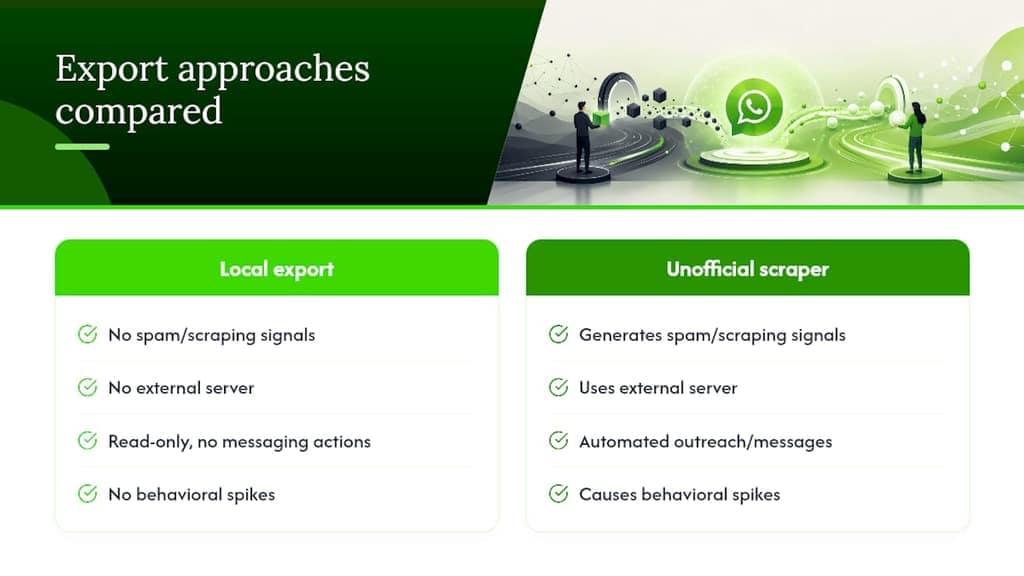
Here's how the main export methods compare on risk and fit:
Mastros operates in a read-only Web Mode for WhatsApp Web. It exports group members, chat messages, and recent contacts directly in your browser, with no external server upload and no API key required. It doesn't send messages, automate conversations, or simulate user activity. That design keeps it well outside the behaviors WhatsApp's systems flag as scraping or automation. Exports come out in CSV, Excel, or JSON, ready for CRM import or research use. You can find detailed privacy-first export workflows in the Mastros WhatsApp group exporter guide.
If you plan to follow up a large export with outreach, leave a gap between the export and the first message, and keep sending volume low on a consumer account. WhatsApp publishes no safe number, so treat any figure you read as a guess.
How businesses should handle high-volume messaging safely
Consumer WhatsApp accounts are not built for bulk outreach. Using one for mass messaging is the single most common reason business accounts get banned.
The right path for businesses is the WhatsApp Business API, accessed through a Meta-approved Business Solution Provider. It's designed for opt-in messaging at scale, with template approval flows and built-in rate controls.
Operational controls every business should have in place:
- Explicit opt-in capture before adding anyone to a messaging list. A checkbox at checkout or a keyword reply to a short code both work.
- Message template approval for structured outreach. Approved templates reduce the chance of messages being flagged as spam.
- Monthly volume caps per number. Even with the API, don't push a single number to its ceiling immediately.
- Server-side rate-limiting and backoff. If delivery rates drop or complaint rates climb, your system should automatically slow down.
- Complaint and delivery logging. Keep records so you can audit spikes and respond before they escalate.
- Gradual warm-up for new numbers. Start at low daily volumes and scale up slowly.
WhatsApp doesn't publish message-per-hour or per-day limits for consumer accounts. Treat any sudden volume increase as a risk event. The Business API has tiered messaging limits tied to your account's quality rating, which scales up as you demonstrate clean sending behavior.
Warning: never use a personal WhatsApp account or an unofficial automation script for mass outreach. Those patterns look identical to spam from WhatsApp's perspective, and the ban usually follows quickly.
What to do immediately after a WhatsApp ban
If you see "This account can't use WhatsApp," the appeal process is straightforward, but the outcome isn't guaranteed.
- Take a screenshot of the ban message. You'll want a record of the exact wording and timestamp.
- Open WhatsApp and look for the "Request review" button. If it's visible, tap it. This is the official in-app appeal channel, per the WhatsApp Help Center.
- Provide concise, factual context in your appeal. Explain what you were doing and why it was legitimate. Don't over-explain or speculate.
- Wait for an in-app notification. WhatsApp reviews one phone number per appeal, and many reviews complete within approximately 24 hours, according to the WhatsApp Business app Help Center.
- Track status inside the app. Don't submit multiple appeals or contact support from a different account; that doesn't speed things up and can complicate the review.
A few realistic expectations: if the ban message shows no "Request review" option, the ban is likely permanent and treated as final. Third-party services that claim they can unban your account cannot. Only WhatsApp can lift a ban, and no payment to a third party changes that. While your number is banned, any backups or exports tied to it remain inaccessible.
Running a post-unban audit to prevent a repeat ban
Getting unbanned is step one. Staying unbanned requires removing whatever triggered the ban in the first place.
Run this audit in the first 48 hours after your number is restored:
- Identify and uninstall any modified WhatsApp clients. Switch to the official app or WhatsApp Business app only.
- Review your recent export and outreach lists. Check every contact for opt-in status. Remove anyone who didn't explicitly consent.
- Implement rate limits and logging before sending another message. Set a hard cap on hourly and daily send volumes.
- Disable any browser automation scripts that were interacting with WhatsApp Web on your behalf.
- Monitor block and report metrics for 7–14 days. Keep a short log of daily outreach volume and complaint counts. If either climbs, pause and audit again.
- Warm up your number again as if it were new. Even a restored number benefits from a gradual ramp-up before returning to normal volumes.
The goal is to make your account's behavior look like a normal human user's for at least two weeks before scaling anything. Jumping straight back into high-volume activity after an unban is one of the fastest ways to trigger a second ban.
Why privacy-first, local exports are the sustainable approach
The conventional wisdom in growth marketing is to move fast and automate everything. On WhatsApp, that approach has a hard ceiling, and the ceiling is a permanent ban.
The accounts that stay in good standing long-term share a common pattern: they treat WhatsApp's enforcement model as a behavioral filter, not a technical one. The system isn't looking for a specific tool; it's looking for patterns that resemble spam, scraping, or abuse. A local, read-only export that never touches a messaging action produces none of those signals. An unofficial scraper that harvests contacts and fires off outreach produces all of them.
Mastros's commitment to local processing isn't just a privacy feature. It's an architectural choice that keeps the extension's behavior outside the detection surface WhatsApp monitors. No external server means no server-side scraping signal. No messaging automation means no behavioral spike. That's the right design for anyone who needs to export WhatsApp data without putting their account at risk.
The privacy-first model also scales better over time. When your export workflow doesn't depend on unofficial APIs or modified clients, you're not one WhatsApp policy update away from a broken tool and a banned account.
Mastros gives you a read-only WhatsApp exporter with no ban risk from automation
If you need to export WhatsApp group members, chat messages, or recent contacts without triggering automated enforcement, Mastros's WhatsApp Scraper Chrome Extension is built for exactly that. It runs in read-only Web Mode directly in your browser, processes everything locally, and never uploads your data to an external server. No WhatsApp API keys required. No messaging automation. No simulated user activity.
Exports come out in CSV, Excel, or JSON, ready for CRM import, research, or list management. Free and paid plans are available, with higher export quotas on paid tiers. Visit Mastros to try the free plan and see the full feature set before committing to anything.
Sources
Official and reputable references used throughout this article:
- About account bans | WhatsApp Help Center
- About temporarily banned accounts | WhatsApp Help Center
- WhatsApp banned 5.1 million accounts in June: Here’s what can get your account banned - The Times of India
- WhatsApp Feature Blocks People From Exporting Your Chats
FAQ
Can you override or bypass a WhatsApp ban?
No. Only WhatsApp can lift a ban. Use the in-app "Request review" option if it appears; third-party services that claim to unban accounts cannot do so.
Why can't I export my WhatsApp chat after a ban?
Backups and exports tied to your phone number are inaccessible while the number is banned, per the WhatsApp Help Center. You need the ban lifted before you can access or export that data.
Is a WhatsApp ban permanent?
Not always. Temporary bans include a "Request review" option and many resolve within approximately 24 hours. If no review option appears, the ban is likely permanent and treated as final by WhatsApp.
Will the other person know if I export a WhatsApp chat?
WhatsApp does not notify the other person when you export a chat using the official in-app export feature. However, if the other person has enabled Advanced Chat Privacy, that setting can block chat exports for other participants.
How does Mastros export WhatsApp data without triggering a ban?
Mastros uses a read-only Web Mode that runs in your browser and processes data locally, with no external server upload, no messaging automation, and no WhatsApp API access required. That keeps its behavior outside the patterns WhatsApp's systems flag as scraping or automation.