



TL;DR:
- Local browser extensions process data on your device, offering privacy and detection advantages over server-based tools. Mastros provides local exports for WhatsApp, Telegram, LinkedIn, Instagram and TikTok in formats like CSV and JSON. TeleSender is a bulk sender; Mastros sends nothing, so it replaces the data side of TeleSender, not the messaging side. Using these tools simplifies legal obligations, enhances security, and maintains full control over contact data.
The best alternative to TeleSender-style tools is a local, browser-based extension that processes Telegram, WhatsApp, and LinkedIn data directly on your device and exports clean CSV or JSON without sending raw contact data to a third-party server. Mastros is the recommended option for growth teams that need privacy-first exports and want to stay on the right side of CCPA/CPRA. One honest caveat: TeleSender bundles a scraper with a bulk sender and an auto inviter. Mastros sends nothing and invites nobody, so if you want to message the list you scraped, TeleSender is the tool for that, not Mastros. For Telegram, the Mastros Telegram extension exports group members, chat messages and recent contacts from Telegram Web to CSV, JSON or JSONL.
Why local-browser extensions win:
- Local-first processing: data never leaves your browser, so there's no cloud storage risk and no third-party server exposure
- Lower detection and block risk: the extension runs inside your authenticated session, making it technically indistinguishable from manual browsing
- Chrome Web Store compliance: published extensions must post a privacy policy and limited-use disclosures, even when data stays local
- Practical export formats: CSV, JSON and JSONL (CSV opens directly in Excel), ready for CRM import or enrichment pipelines
- U.S. compliance support: CCPA/CPRA require prompt DSAR responses within a reasonable time frame and consent recordkeeping; local-first tools simplify both
Table of Contents
- Why are local browser extensions safer than server-side scraping?
- What data can you export from each platform?
- What export formats are available, and how do you use them?
- What U.S. compliance obligations apply to lead-gen exports?
- What do Chrome Web Store policies require for data-handling extensions?
- How do you keep exported PII secure after the export?
- Do you need Telegram API credentials or a special mode?
- What should you expect on pricing and export quotas?
- Fast-start checklist: install and run your first secure export
- Key Takeaways
- The case for local-first: why it's not just a privacy talking point
- Mastros gives you local exports across all five platforms
- Useful sources
- FAQ
Why are local browser extensions safer than server-side scraping?
Browser-based extensions run inside your authenticated session, which means they interact with the DOM exactly the way a human would. The platform sees normal session cookies, a real TLS fingerprint, and standard browser behavior. Server-side scrapers and headless automation tools, by contrast, generate synthetic sessions that platforms increasingly fingerprint and block.
On-device processing also removes an entire class of risk. When data never leaves your browser, there's no API call carrying raw PII to a vendor's cloud, no breach surface on a third-party server, and no data-in-transit exposure. That matters especially for WhatsApp and LinkedIn, where account-level enforcement can be swift.
LinkedIn is worth a specific note. The platform actively scans for extensions that automate actions or inject code, so stick to exporting only the data you can already see on screen. Never automate clicks, connection requests, or messages through an extension.
Pro Tip: Keep your export sessions short and spread them across normal working hours. Bursting 10,000 rows in two minutes looks nothing like human browsing, even inside a real browser session.
What data can you export from each platform?
| Platform | Exportable fields | Notes |
|---|---|---|
| Telegram | Group members, chat messages, timestamps, mutual groups, recent contacts, bulk media | No setup: reads the Telegram Web session you are signed into, no API credentials |
| Group members, chat messages, recent contacts, media | Read-only; no messaging or automation | |
| People, companies, jobs, post results, Sales Navigator leads and accounts | Exports visible search results only | |
| Instagram (beta) | Followers and following, posts, reels and stories, post comments and likers, emails and websites from the bio, media | Read-only |
| TikTok (beta) | Creator search, profile videos, video comments, emails and websites from the bio, media | Read-only |

The Telegram extension needs no API credentials: it reads through the Telegram Web session you are already signed into, so there is nothing to register at my.telegram.org. The WhatsApp extension is intentionally read-only: you get what's visible in the chat interface, nothing more.
Practical use cases by platform:
- Telegram: pull a community member list for B2B outbound, export group messages for sentiment research, or build a recruiter pipeline from niche groups
- WhatsApp: export recent contacts from a business group for CRM import or map group membership for community analysis
- LinkedIn: export Sales Navigator lead lists, job search results, or company pages into structured files for enrichment
What export formats are available, and how do you use them?
| Format | Best for | Notes |
|---|---|---|
| CSV | Flat contact lists, CRM imports | Universal compatibility; use UTF-8 encoding |
| Excel (via CSV) | Stakeholder sharing, quick filtering | Open the CSV in Excel; the Telegram extension saves CSV, JSON or JSONL, not a native .xlsx file |
| JSON | Nested objects, messages with metadata | Preserves structure; easier to parse programmatically |
| JSONL | Streaming pipelines, large datasets | One record per line; works well with BigQuery and dbt |
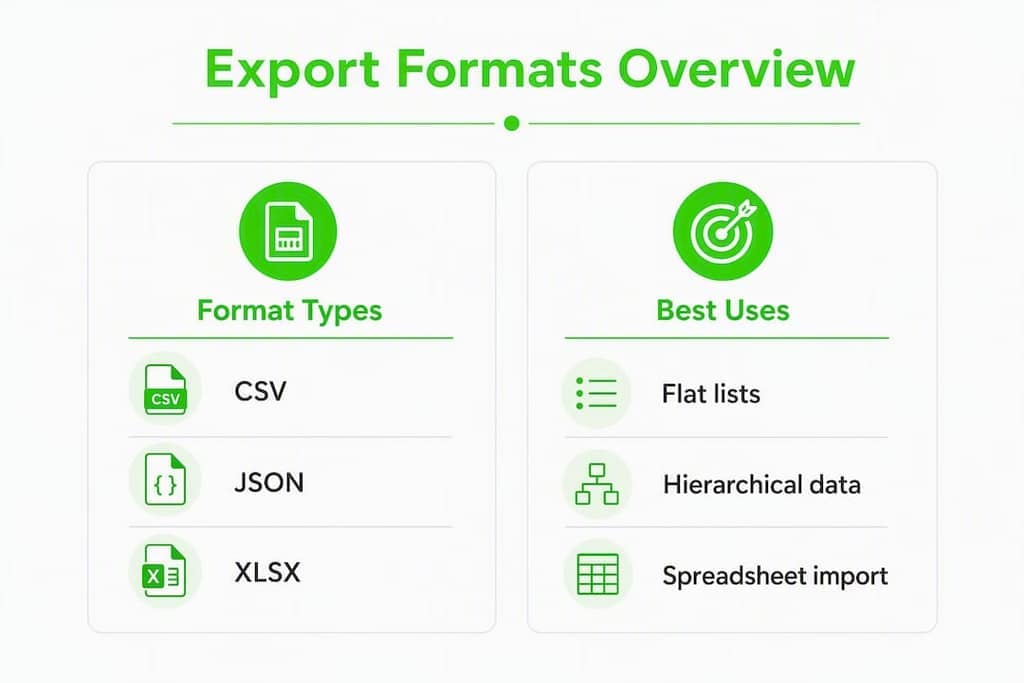
For most CRM imports, CSV is the right call. For anything with nested fields (message threads, mutual groups, media metadata), JSON or JSONL preserves the structure you'll need downstream.
Common workflow steps after export:
- Dedupe: match on phone number or username before importing; duplicates are common across overlapping groups
- Normalize: standardize phone formats to E.164 (
+1XXXXXXXXXX) and timestamps to UTC ISO 8601 - Enrich: pass emails or LinkedIn URLs through an enrichment tool before pushing to your CRM
- Map fields: align exported column names to your CRM's field schema before bulk import
- Check character encoding on every file. UTF-8 is the safe default; mismatched encoding breaks names with accented characters or non-Latin scripts.
What U.S. compliance obligations apply to lead-gen exports?
CCPA/CPRA violations can result in fines of $2,500 to $7,500 per incident, and DSARs must be honored within 45 days. For any growth team exporting contact data for lead generation, that's not a background concern — it's an operational requirement.
Documenting your role as controller vs. processor and signing DPAs with vendors is central to staying compliant. Your CRM, enrichment tool, and any export storage layer all count as processors if they touch personal data on your behalf.
Compliance checklist:
- Post a clear privacy notice covering your lead-gen data use
- Record consent at the point of collection, with timestamps
- Maintain a DSAR playbook with a 45-day response SLA
- Sign DPAs with every vendor that processes exported PII
- Log export metadata: date, dataset, purpose, and who authorized it
- Set a data retention policy and enforce deletion at end of retention period
What do Chrome Web Store policies require for data-handling extensions?
Extensions that handle user data must post a privacy policy and disclose limited-use details, even when all processing stays local in the browser. A missing or placeholder privacy policy causes immediate rejection.
The least-privilege principle applies to every permission you request. If a permission isn't required for the core export function, make it optional rather than required.
Permission checklist:
- Use
storage.localinstead ofstorage.syncto keep data on-device - Request
activeTabrather than broad host permissions (*://*/*) wherever possible - Avoid cross-site permissions unless the export genuinely requires them
- Declare every permission in the manifest with a clear user-facing justification
- Review permissions at each release; remove any that are no longer needed
Pro Tip: Write your Chrome Web Store privacy statement in plain language and lead with the phrase "all data is processed locally in your browser." Reviewers and users both respond better to that framing than to legal boilerplate.
How do you keep exported PII secure after the export?
Encrypting PII before writing to local storage is required to meet GDPR Article 32 security expectations, and it's good practice regardless of jurisdiction. Use a reputable library and never store the encryption key alongside the data.
Operational security steps:
- Encrypt exported files with AES-256 before saving; libraries like
crypto-jsorTweetNaCl.jswork well in browser contexts - Move exports to a secure, access-controlled location immediately after download
- Apply role-based access: only the team member who needs the file should have it
- Store export metadata separately: dataset name, export date, purpose, and authorizing user
- Set ephemeral storage for raw exports; delete after enrichment and CRM import are complete
Additional security bullets:
- Sign extension builds and verify signatures before each release
- Keep extension dependencies updated; outdated libraries are the most common attack surface
- Audit permissions on every version bump and remove anything unused
Do you need Telegram API credentials or a special mode?
| Setup | Processing location | Data richness | Detection risk | Setup complexity |
|---|---|---|---|---|
| Mastros Telegram extension | On-device, in your browser | Members, messages, contacts, mutual groups, media | Low (reads your own signed-in session) | Install and go: no API credentials, no modes |
| Your own Telethon/MTProto script | Your machine or server | Whatever you code | Moderate (API rate limits apply) | Requires personal api_id and api_hash from my.telegram.org |
No. Earlier 4.x versions of the Mastros Telegram extension had a "Power Mode" that asked for your own api_id and api_hash; it was removed in v5.0 when the extraction engine was rewritten. There is now a single engine with no credentials and no modes to choose between: it reads the Telegram Web session you are already signed into. If you want a custom pipeline, a Telethon script still needs an api_id and api_hash, because it opens its own client connection.
WhatsApp works the same way. The extension operates read-only: it exports what's visible in WhatsApp Web and does nothing else. No messages sent, no automation, no API access.
What should you expect on pricing and export quotas?
Mastros uses tiered subscription plans based on monthly export volume. For Telegram, the Free plan covers 250 profiles and 300 messages a month with every tool unlocked and no account needed; Pro is $9 a month for 5,000 profiles and 10,000 messages, and Scale is $18 a month for 100,000 profiles and 500,000 messages. Paid plans raise the allowance; they do not unlock different features.
When estimating costs, think through:
- Monthly export volume: how many rows per platform, per month
- Burst needs: do you need to export a 50,000-member group in one session, or spread it across the month
- Media: on Telegram, each downloaded media file counts as one message against the monthly allowance
- Compliance work: consent records and DSAR handling sit with your own team and tools, not the export plan, so budget for that process separately
Fast-start checklist: install and run your first secure export
- Visit the Mastros product page and read the privacy policy before installing
- Install the extension from the Chrome Web Store; verify the publisher name matches
- Check the permissions dialog: confirm no unexpected cross-site permissions are requested
- Open the target platform (Telegram Web, WhatsApp Web, or LinkedIn) in Chrome
- Run a small test export (50–100 rows) and verify the output file format and encoding
- For Telegram, there are no API credentials to enter: make sure you are signed into Telegram Web in the same browser
- Move the exported file to encrypted, access-controlled storage immediately
- Log the export: date, platform, dataset, purpose, and authorizing team member
- Run dedupe and normalization before any CRM import
Post-export actions:
- Delete the raw export file once enrichment and import are complete
- Confirm the CRM import mapped fields correctly before activating any outreach sequence
- Archive the consent record and export log for your DSAR playbook
Key Takeaways
Local-browser extensions that process data on-device are the most privacy-compliant and detection-resilient alternative to server-side export tools for WhatsApp, Telegram, LinkedIn, Instagram and TikTok.
| Point | Details |
|---|---|
| Local-first is the default | On-device processing eliminates cloud storage risk and keeps you off third-party servers. |
| CCPA/CPRA fines are real | Violations cost $2,500–$7,500 per incident; maintain consent logs and a 45-day DSAR SLA. |
| Platform coverage | Each platform exports different fields; the Telegram extension needs no API credentials or setup. |
| Chrome Web Store rules apply | Post a privacy policy, disclose limited-use, and request only the permissions you actually need. |
| Mastros is the recommended tool | Install the free plan to test exports on any of the five platforms before committing to a paid tier. |
The case for local-first: why it's not just a privacy talking point
Most teams shopping for a TeleSender alternative focus on feature count. What they underestimate is how much the processing location changes their compliance posture. When data stays in the browser, the DSAR response becomes straightforward: you know exactly what was exported, when, and by whom, because the audit trail lives with the team that ran the export.
The teams that struggle with compliance aren't usually the ones that chose the wrong tool. They're the ones that treated consent and recordkeeping as an afterthought. A recruiter exporting a LinkedIn Sales Navigator list for a B2B campaign still needs to document the lawful basis, the retention period, and the vendor agreements for every tool that touches that file downstream. Local processing simplifies the first step; the rest is process discipline.
Mastros gives you local exports across all five platforms
If you've been relying on cloud-based tools that upload your contact data to external servers, Mastros is a direct upgrade in both privacy and control. The Telegram scraper exports group members, messages, mutual groups, and bulk media, with no API credentials and nothing to set up. The WhatsApp exporter is read-only, pulling group members, messages, recent contacts and media without touching the WhatsApp API. The LinkedIn exporter turns Sales Navigator searches and people results into structured CSV or JSON files ready for CRM import. Instagram and TikTok extensions, both in beta, export followers, comments, videos and bio contact details the same way.
All five extensions process data locally, require no external upload, and are published on the Chrome Web Store with clear privacy disclosures. Start with the free plan to run your first export and see the output format before committing to a paid tier.
Useful sources
- California Privacy Protection Agency (CPPA): official CCPA/CPRA guidance, fine ranges, and DSAR requirements
- Chrome Web Store: User Data FAQ: required disclosures, privacy policy rules, and permission policies for extensions
- GDPR Article 32: Security of processing: encryption and security standards referenced for local PII storage
- Growleads: GDPR and CCPA compliance for B2B lead generation: controller vs. processor roles and DPA requirements
- Mastros blog: Privacy-first chat data extraction: implementation guide for local-first export design and Chrome Web Store best practices
This article is general information, not legal advice. Confirm current CCPA/CPRA requirements with the California Privacy Protection Agency or a qualified privacy attorney.
FAQ
What is the best privacy-first alternative to TeleSender for exporting Telegram data?
Mastros is the recommended option: a Chrome extension that exports Telegram group members, messages, mutual groups, and media locally in your browser, with no external upload required.
Does Mastros work for WhatsApp and LinkedIn exports too?
Yes. Mastros offers separate extensions for WhatsApp (read-only, no messaging), LinkedIn (people, companies, jobs, and Sales Navigator leads), and, in beta, Instagram and TikTok, all with local on-device processing.
What does CCPA require when exporting contact data for lead generation?
CCPA/CPRA require a clear privacy notice, consent recordkeeping, and honoring data subject access requests within 45 days; violations can result in fines of $2,500 to $7,500 per incident.
What happened to Telegram Power Mode?
Power Mode was an option in earlier 4.x versions that asked for your own api_id and api_hash. It was removed in v5.0 when the extraction engine was rewritten. The current extension has one engine, no credentials and no modes: it reads the Telegram Web session you are already signed into.
Do Chrome extensions need a privacy policy even if data stays local?
Yes. Chrome Web Store policies require any extension that handles user data to post a valid privacy policy and disclose limited-use details, regardless of whether data is processed locally or sent to a server.