



Telegram group analysis is the process of exporting group data and measuring member and activity metrics to understand how a community behaves. The fastest path to insight is a structured export followed by an automated parser and a dashboard, not a manual scroll through chat history. The Mastros Telegram extension produces that export, saving group members and chat messages to CSV, JSON or JSONL. Before you build anything elaborate, check four numbers:
- Member growth (joins minus leaves, tracked daily or weekly)
- DAU/MAU ratio (daily active users divided by monthly active users)
- Message volume (total and per-active-member)
- Engagement rate (replies, reactions, and forwards relative to posts)
Platforms like TGStat track these at scale for public channels, using hourly subscriber dynamics and post-view stats to benchmark activity. For your own group, you don't need an external service to start. A client-side export tool followed by a spreadsheet or lightweight script gets you a working dashboard in an afternoon.
Key Takeaways
Telegram group analysis works best as an export first, then parse, then measure workflow built on DAU/MAU, engagement rate, and churn as the three metrics that matter most.
| Point | Details |
|---|---|
| Start with core metrics | Track member growth, DAU/MAU, and churn before building any visualization. |
| Choose export method by scale | Use browser-based client-side export for one-off audits, MTProto for scheduled ingestion. |
| Normalize before comparing | Measure messages per active member, not raw totals, when benchmarking similar groups. |
| Filter noise first | Remove bot and spam activity before computing engagement rate or sentiment trends. |
| Map influence through replies | Rank members by replies received, not sent, to find real moderators. |
Table of Contents
- What Counts as Core Metrics and Dashboard Data for Telegram Group Analysis
- Post and Media Analytics That Show Which Content Works
- Export and Tooling Options for Pulling Telegram Data
- Building a Repeatable Telegram Group Analysis Pipeline
- Implementation and Privacy Notes for Running Exports Safely
- Reading the Mood: Sentiment Analysis of Group Conversations
- Mapping Who Talks to Whom: Network Analysis of Member Interactions
- Finding Your Real Influencers and Moderators
- Benchmarking Against Similar Telegram Groups
- Turning Exports Into Ongoing Insight
- Sources
- FAQ
What Counts as Core Metrics and Dashboard Data for Telegram Group Analysis
Every useful dashboard starts with three buckets: who's in the group, how active they are, and how they interact. Member metrics track raw counts, but churn is the number that actually tells you something. Calculate it as members lost over a period divided by average membership during that period. A group that gains many people a month while losing nearly as many looks healthy on paper until you compute a high churn rate.
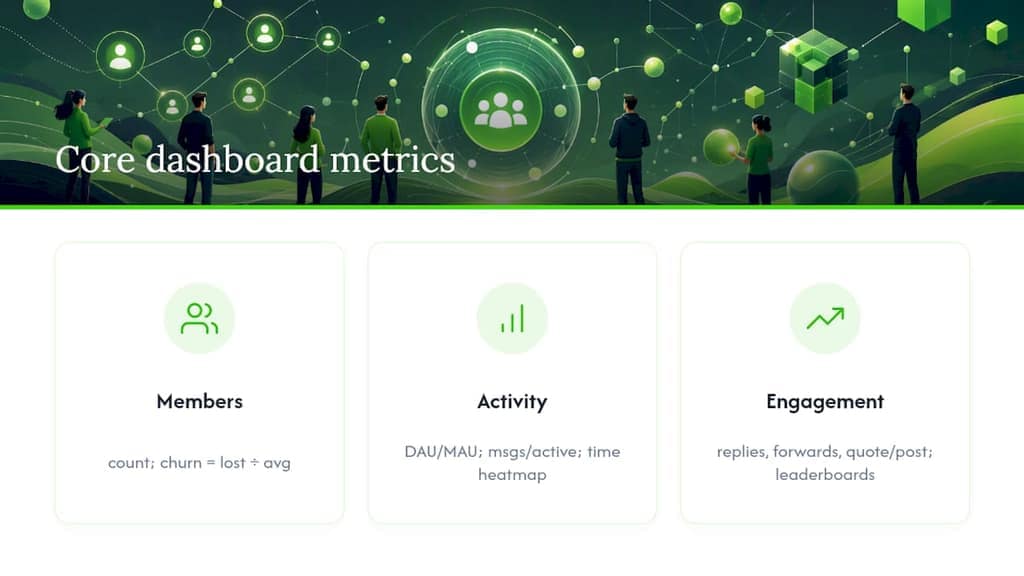
Activity metrics go deeper than "messages sent." DAU/MAU is the standard stickiness ratio. A DAU/MAU ratio above a moderate threshold suggests a genuinely engaged community; a low ratio usually means people joined and forgot the group exists. Messages per active user separates a chatty core group from a large but silent audience. Time-of-day heatmaps matter more than most admins realize. A group that peaks at 9 PM local time and gets nothing but bot pings at 4 AM tells you exactly when to schedule announcements.
Engagement metrics round out the picture: reply counts, forward rates, and a quote-to-post ratio that flags which messages actually spark conversation versus which ones just sit there. Leaderboards of top contributors help you spot who's doing the heavy lifting.
Dashboards translate all of this into something scannable. Time-series charts show growth and message volume over weeks. Cohort charts track how a group of members who joined in the same week behaves over time. Leaderboards rank top talkers and top-forwarded posts side by side, which is usually the fastest way to find your community's real influencers before you go hunting for them manually.
Post and Media Analytics That Show Which Content Works
Raw view counts mean little without context. A post with modest raw views in a moderately sized group has a view ratio that tells you more than the raw number ever could. Track that ratio across posts, and you'll usually find a handful of formats (polls, short video, or direct questions) that consistently outperform the rest.
Forwards, replies, and quotes are your virality signals, and they behave differently. A high reply count means people are talking to each other, not just reacting to you. Forwards mean someone found the content worth sharing outside the group entirely, which is the strongest content signal Telegram gives you.
Media analytics require mapping downloads back to the original message and timestamp, since Telegram doesn't do this for you automatically. Once you have that mapping, you can tell whether a video underperformed because of the format or because it posted at a dead hour.
- Flag accounts that post identical text across multiple channels within minutes
- Watch for message bursts with zero replies over long stretches, a common bot signature
- Cross-reference join timestamps with first-message timestamps, since real members typically lurk before posting
Pro Tip: Sort your exported messages by sender and message length. Accounts sending near-identical short messages every few minutes are almost always automated, and filtering them out before you calculate engagement rate will change your numbers more than you'd expect.
Export and Tooling Options for Pulling Telegram Data
Three routes exist for getting Telegram data into a form you can analyze, and picking the wrong one wastes hours.
- Telegram Desktop export. Built into the official app, this produces HTML or JSON archives of an entire chat or channel history. It's the right call for a one-off full-account backup, but it's clumsy for ongoing analysis since there's no filtering, no member-list export, and no automation. Read how Telegram Desktop chat export works before relying on it for anything beyond archival.
- Browser-based client-side exporters. These run inside Telegram Web and pull member lists, messages, mutual groups, and media without uploading anything to an external server. Client-side exporters read through the Telegram Web session you are already signed into, so they need no API credentials, even for large groups.
- MTProto libraries. Tools like Telethon or GramJS give you programmatic, repeatable access to Telegram's API directly, which suits teams running scheduled ingestion across many groups.
If you're doing a one-time audit, a browser exporter is faster than writing code. If you need scheduled ingestion across dozens of groups, MTProto libraries pay off despite the setup cost. If you're archiving heavy media libraries, weigh export time against storage before choosing either route.
Pro Tip: Start with the browser exporter even if you eventually plan to build an MTProto pipeline. It tells you what the data actually looks like before you invest engineering time in parsing it.
Building a Repeatable Telegram Group Analysis Pipeline
A minimal pipeline has four stages, and skipping any one of them is how dashboards end up with duplicate users and broken timestamps.
- Export. Pace your requests and handle FLOOD_WAIT responses with backoff rather than retrying immediately. Persist session data so a large group doesn't force you to start over after an interruption.
- Parse. Normalize timestamps to a single time zone, dedupe users by ID rather than display name (people change names constantly), and structure raw exports into CSV or JSONL. JSONL streams better for large message dumps; CSV works best for member lists headed into a CRM.
- Compute. DAU/MAU divides daily active accounts by monthly active accounts over the same window. Engagement rate is typically (replies + reactions + forwards) divided by total posts. Retention cohorts group members by join week and track how many are still active four weeks later.
- Report. Visualize trends with a time-series chart for growth, a heatmap for activity by hour, and a leaderboard for top contributors. Schedule the pipeline to run weekly and set alert thresholds for sudden drops in DAU/MAU or spikes in leaves.
| Pipeline Stage | Primary Risk |
|---|---|
| Export | Flood limits interrupting large pulls |
| Parse | Duplicate users from display-name changes |
| Compute | Miscounted actives from bot noise |
| Report | Stale dashboards from missed schedule runs |
Open-source tooling like amiryousefi/telegram-analysis already handles much of the parsing and metric computation step, which saves you from writing these formulas from scratch.
Implementation and Privacy Notes for Running Exports Safely
Processing exports locally in the browser, rather than shipping raw chat data to a third-party server, removes an entire category of risk. There's no upload step where a leak or a breach could expose member lists or message content. And because the extension reads through your existing Telegram Web session, there are no API credentials to create, store or leak either.
A few rules keep this safe in practice:
- Never log raw message content in application logs, even temporarily
- Let users delete stored session credentials whenever they want
- Detect FLOOD_WAIT responses and back off automatically instead of hammering the API
Bot-based ingestion has a real limitation here: privacy mode has to be disabled for a bot to see non-command messages, which means broader message visibility than most admins realize they're granting. For most audits, a client-side export from Telegram Web avoids that trade-off entirely.
Reading the Mood: Sentiment Analysis of Group Conversations
Message volume tells you a group is active. It doesn't tell you whether that activity is enthusiasm or frustration, and that distinction matters more for community health than almost any other metric.
Basic sentiment analysis on exported messages works by scoring text as positive, negative, or neutral, either through a keyword-based lexicon or a lightweight classifier trained on labeled examples. For Telegram exports, this usually means running your parsed JSONL file through a sentiment library after cleaning out URLs, emoji-only messages, and forwarded content that isn't original commentary.
The practical value shows up in trend lines, not single scores. A group whose sentiment holds steady around neutral to positive but dips sharply after a product announcement or policy change is telling you something a raw message count never would. Track sentiment alongside your engagement rate and you'll often find they move in opposite directions during controversies: engagement spikes while sentiment drops, because people are arguing, not celebrating.
Sentiment analysis on group chat has real limits worth naming. Sarcasm and inside jokes routinely confuse keyword-based scoring. Group-specific slang and abbreviations need custom dictionaries to score correctly, especially in niche technical or regional communities. Language mixing, common in international Telegram groups, breaks most off-the-shelf sentiment tools unless they're multilingual by design.
Treat sentiment scores as a directional signal you check weekly, not a precise instrument you report to stakeholders as fact. Pair a sentiment dip with a manual read of the actual messages before drawing conclusions about what caused it.
Mapping Who Talks to Whom: Network Analysis of Member Interactions
Every group has an interaction structure hiding underneath the message log, and network analysis is how you make it visible. Build it by treating each reply, quote, or mention as a directed edge between two members, then visualize the result as a graph where node size reflects message volume and edge thickness reflects interaction frequency.

The pattern that emerges usually falls into one of two shapes. A hub-and-spoke structure, where most replies flow to and from a small handful of accounts, typically means the community depends heavily on a few power users or the admin team. A distributed mesh, where members reply broadly to each other rather than funneling through a center, usually signals a healthier, more self-sustaining community that would survive an admin going quiet for a week.
Tools for this range from simple: exporting reply-to relationships into a CSV and loading them into Gephi, to more involved network-analysis scripts built on Python libraries like NetworkX. Either approach works from the same source data you already pulled for your engagement metrics, since reply chains and quoted messages carry the relationship data natively.
Network analysis also surfaces isolated clusters, subgroups of members who talk heavily to each other but rarely to the rest of the community. In large groups, this often reveals regional subcommunities, topic-specific factions, or, less charitably, coordinated spam rings that only interact among themselves. Spotting a cluster like that early is usually faster through a network graph than through manual message review, since the pattern jumps out visually in a way raw text never does.
Finding Your Real Influencers and Moderators
Follower count and admin badges don't reliably tell you who actually shapes a group's conversation. Message-level data does, and the gap between the two can be significant.
Start with three signals pulled directly from your parsed export: reply volume received (not sent), forward count on original posts, and response time when new members ask questions. A member who rarely posts but gets replied to constantly whenever they do is functionally more influential than an admin who posts daily and gets ignored.
Combine this with the network analysis from the previous section. Members sitting at high-degree nodes, meaning they connect to many other members through replies and mentions, are your informal moderators whether or not they hold the title. In several community audits, the account fielding the most new-member questions turns out not to be an admin at all, just a long-tenured regular who's built enough trust that people ask them instead of posting to the group at large.
This matters practically in two ways. First, if that informal moderator ever leaves, you'll likely see a measurable engagement dip, since their absence removes a de facto support function nobody planned for. Second, these members are your highest-value people to formally recruit into moderation roles or reward with recognition, since the community has already voted with its behavior.
Leaderboards ranking members by replies received, not sent, will surface these people faster than scrolling through admin lists ever could.
Benchmarking Against Similar Telegram Groups
Comparative analysis is what turns a raw metric into a judgment call, and most community managers skip it entirely because there's no built-in Telegram feature for it.
The practical approach: identify three to five public groups in your niche of comparable size, and where their activity is visible (public groups often show member counts and recent message activity), track the same core metrics you're already computing for your own group. Public-group analyzers, including tools that estimate bot ratio and spam scores from sampled messages, can give a rough read on whether a competitor's impressive member count is inflated by inactive or automated accounts before you benchmark against it.
Normalize for size before comparing anything. A 50,000-member group posting 200 messages a day is far less active per capita than a 2,000-member group posting the same volume. Messages per active member per day is the fairer comparison than raw totals.
Watch for a specific trap: a competing group with a much larger member count but a thin DAU/MAU ratio is often coasting on old growth, not current engagement. If your smaller group posts a higher engagement rate, that's a genuinely useful data point when pitching sponsors or partners, since sponsors increasingly care about active reach over headline member counts.
Author Recommendation on First Steps for Community Managers
If you're starting from zero, don't build a full dashboard first. Pull one week of member growth and DAU/MAU data using a client-side export, since it's faster to set up than an MTProto pipeline and good enough for an initial read. Build one chart, then test a single hypothesis, such as whether posting time or content format moves engagement. Scale up to scheduled ingestion only once that first test tells you something worth automating.
— Elias
Turning Exports Into Ongoing Insight
Telegram group analysis works best as an export-first workflow: pull structured data locally, parse it into clean CSV or JSONL, and compute a small set of metrics before building anything visual. Community managers who skip straight to dashboards without cleaning bot noise and duplicate users end up trusting numbers that don't reflect reality.
For teams ready to move past manual review, the Mastros Telegram Scraper exports member lists, messages, mutual groups, and bulk media directly from Telegram Web, with no API credentials to set up. It runs client-side, so exported data never leaves your browser before you decide what to do with it. Pair that export with a parser like amiryousefi/telegram-analysis and you have a working analysis pipeline without writing an ingestion script from scratch.
Sources
FAQ
What Is the Fastest Way to Start Analyzing a Telegram Group?
Export member and message data with a client-side browser tool, then compute DAU/MAU and member growth over a one-week sample before building a full dashboard.
Do I Need MTProto Access for Basic Group Analysis?
No. Browser-based exporters cover most member-list and message-export needs; MTProto libraries like Telethon only pay off for scheduled, large-scale ingestion.
How Do I Detect Bots in a Telegram Group?
Look for accounts posting near-identical messages within minutes of each other and message bursts that receive zero replies, both common automation signatures.
Is Sentiment Analysis Reliable for Telegram Chats?
It's directional, not precise. Sarcasm, slang, and mixed-language messages routinely confuse keyword-based sentiment tools, so treat sentiment trends as a signal to investigate, not a final verdict.
What File Format Should I Export Telegram Messages In?
JSONL works best for large message exports because it streams well, while CSV is better suited for member lists headed into a CRM.