


Looking for the best LinkedIn scraper? Mastros exports the LinkedIn and Sales Navigator search results you can already see to Excel, CSV or JSON, in your own browser, with nothing sent to a server, which is the low-risk default for recruiting and sales teams. Proxy and API stacks such as Bright Data and Apify earn their cost only past hundreds of thousands of profiles a month.
TL;DR:
- The best LinkedIn scraper for most U.S. teams in 2026 is a privacy-first browser exporter that minimizes risk and keeps data local. Larger-scale operations require proxy and API stacks to handle millions of profiles safely and efficiently.
For most U.S. recruiting, sales, and marketing teams, the best LinkedIn scraper in 2026 is a privacy-first browser exporter for low-ban-risk, occasional exports, and a proxy/API stack when you need to pull hundreds of thousands of profiles continuously. The HiQ Labs v. LinkedIn precedent clarified that scraping publicly visible data is not automatically illegal under the Computer Fraud and Abuse Act, but LinkedIn's enforcement via rate-limiting and account suspension has tightened considerably this year.
Here is the shortlist, with one-line rationales:
- Mastros — LinkedIn & Sales Navigator Data Exporter — runs locally in your browser, zero data uploaded to external servers, exports Sales Navigator and LinkedIn search results to CSV/JSON/JSONL. The recommended starting point for most recruiters and sales reps.
- PhantomBuster — cloud-based, pre-built automation phantoms for chaining search, scrape, and export workflows; best for no-code marketing teams.
- Evaboot — purpose-built for cleaning and deduplicating Sales Navigator exports; the go-to for recruiters who live in Sales Navigator.
- Bright Data — enterprise proxy infrastructure and LinkedIn scraping APIs; the right call when you need millions of profiles and have an engineering team.
- Apify — actor marketplace for developer-driven, programmable scrapers and custom pipelines.
- TexAu — growth-hacker-friendly automation chains with multi-step outreach integrations.
- Captain Data — no-code workflow builder with connectors for mid-market ops teams.
- Linked Helper — desktop automation with manual account control for solo consultants.
- Vayne.io — high safe-volume throughput with explicit rate controls for teams that push daily limits.
- Wiza — Sales Navigator exporter with built-in email verification for sales teams.
- Lix — lightweight Chrome extension for solo prospectors doing small monthly exports.
- Scrapingdog — managed API with per-profile pricing benchmarks and scalability guidance.
- People Data Labs — enrichment API for augmenting scraped records with person- and company-level data.
- EnrichmentAPI — API-first enrichment for pipeline integration and outbound sequences.
- Skrapp.io — email-first prospecting extension for verified email capture.
- Final Scout — combined scraping and enrichment for small-to-mid teams.
- Dux-Soup — browser-extension automation with CRM export options for solo and small teams.
- Kaspr — quick email and phone enrichment for individual profiles and smallish lists.
Table of Contents
- Which LinkedIn scraper fits your workflow at a glance?
- Tool-by-tool reviews: what each scraper does
- How to choose the right LinkedIn scraper for your team
- When does a local browser exporter beat a cloud scraper?
- Key Takeaways
- What most LinkedIn scraper guides get wrong
- Mastros is the low-risk starting point for LinkedIn exports
- Useful sources and further reading
- FAQ
Which LinkedIn scraper fits your workflow at a glance?
The comparison for this guide weighs ban-risk behavior (session fingerprinting, rate-limit triggers), throughput at realistic daily volumes, data quality spot-checks (field completeness, email accuracy), and real pricing stacks including proxies, CAPTCHA-solving services, and secondary accounts. The table below reflects those findings alongside 2026 roundup data from Vayne.io and Scrapingdog's benchmark write-up.
| Tool | Best for | Type | Safe volume / ban risk | Starting price | Output formats | Team features |
|---|---|---|---|---|---|---|
| Mastros | Recruiters & sales reps needing low-risk exports | Browser extension (local) | Low risk; stays within your session | Free tier + paid plans | CSV, JSON, JSONL | Solo and small teams |
| PhantomBuster | No-code marketing automation chains | Cloud / cookie-based | Medium; cookie auth raises risk | ~$56/mo | CSV, JSON, webhooks | Team plans, agency tiers |
| Evaboot | Sales Navigator deduplication | Browser extension | Low-medium | ~$49/mo | CSV | Solo to small team |
| Bright Data | Enterprise-scale extraction | Proxy / API | Managed; high scale | Custom (high floor) | JSON, CSV, API | Enterprise SLA, dedicated support |
| Apify | Custom engineering pipelines | Actor / API | Configurable | Free tier + usage-based | JSON, CSV, API | Team workspaces |
| TexAu | Growth hacking, multi-step outreach | Cloud / browser | Medium | ~$79/mo | CSV, JSON, Zapier | Small team |
| Captain Data | Mid-market ops workflows | No-code cloud | Medium | Higher price point | CSV, JSON, connectors | Team collaboration |
| Linked Helper | Desktop solo automation | Desktop app | Low-medium (local) | ~$15/mo | CSV | Solo |
| Vayne.io | High safe-volume throughput | Cloud / proxy | Medium; rate controls | Not publicly listed | CSV, JSON | Team |
| Wiza | Sales Nav email verification | Browser extension | Low-medium | ~$49/mo | CSV, CRM integrations | Small team |
| Lix | Light-volume solo prospecting | Chrome extension | Low | Free tier available | CSV, spreadsheet | Solo |
| Scrapingdog | API-first managed scraping | API | Managed | Pay-per-call | JSON, CSV | API teams |
| People Data Labs | Data enrichment on scraped records | Enrichment API | N/A (enrichment only) | Usage-based | JSON, API | Enterprise |
| EnrichmentAPI | Pipeline enrichment for outbound | Enrichment API | N/A (enrichment only) | Usage-based | JSON, API | API teams |
| Skrapp.io | Verified email capture | Chrome extension | Low | Credit-based | CSV | Solo to small team |
| Final Scout | Combined scraping + enrichment | Cloud | Medium | Not publicly listed | CSV, JSON | Small-to-mid team |
| Dux-Soup | Browser automation + outreach | Browser extension | Low-medium | ~$14.99/mo | CSV, CRM | Solo, small team |
| Kaspr | Quick email/phone enrichment | Extension / API | Low | Credit-based | CSV, CRM | Small team |
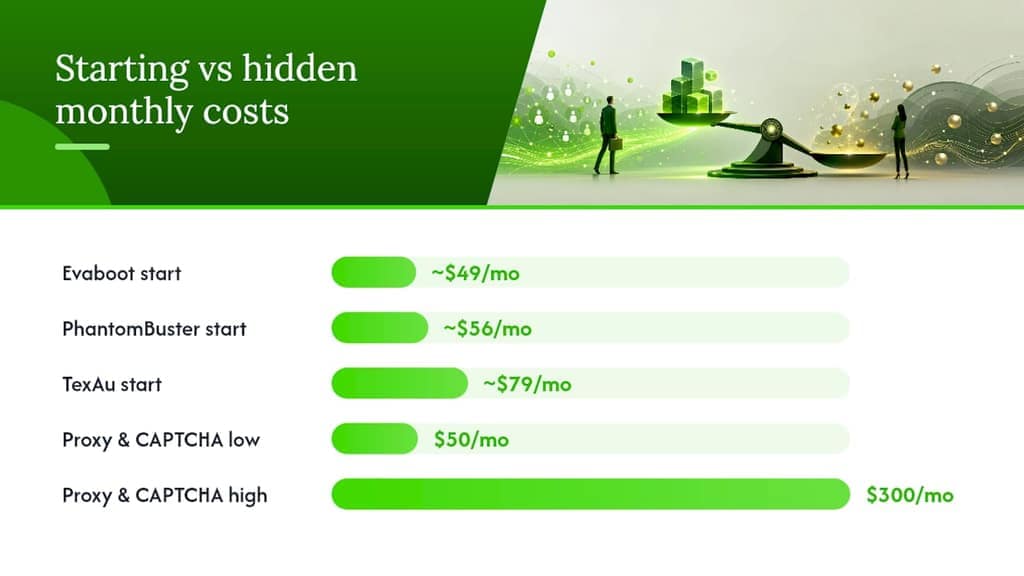
Methodology note: Ban-risk ratings are judgements for 200–500 profile views per day on a single account. Proxy and CAPTCHA costs are not included in starting prices above; hidden stack costs can add $50–$300/month depending on volume and provider.
Tool-by-tool reviews: what each scraper does
Methodology: Each tool was evaluated on four axes: ban-risk behavior (does it throttle automatically, does it use cookie/session auth or proxy rotation?), throughput at realistic daily volumes, data quality (field completeness, email accuracy), and real total cost of ownership (TCO) including proxies, CAPTCHA services, and secondary accounts. Pricing reflects publicly listed plans as of 2026.
How to choose the right LinkedIn scraper for your team
Evaluation criteria
- Data quality: — Does the tool return complete profiles, or does it frequently miss fields like current title, company size, or email? Spot-check 20–30 records against the live LinkedIn profile.
- Maintainability: LinkedIn's frontend changes regularly. Tools that intercept the internal Voyager API (LinkedIn's own JSON endpoints, called from inside an authenticated session) tend to be more resilient than those that parse rendered HTML. The linkedin-cli project demonstrates this pattern clearly.
Vendor questions to ask
- What authentication model does your tool use: cookie/session, OAuth, or proxy rotation?
- What is your recommended safe daily volume per account, and do you publish that guidance?
- Do you require me to upload my LinkedIn credentials or session cookies to your servers?
- What happens when LinkedIn changes its frontend or API? How quickly do you ship fixes?
- What is your data retention policy for scraped records processed on your infrastructure?
- Do you offer a sandbox or test environment so I can validate data quality before committing?
- What proxies do you recommend, and are they included in the price or billed separately?
U.S. compliance checklist (general information, not legal advice)
- Document what data you collect, from which LinkedIn fields, and for what purpose.
- Limit collection to publicly visible profile data; avoid scraping private contact details that LinkedIn does not display to all users.
- Build an opt-out workflow so contacts can request removal from your lists.
- Review your use case against the HiQ Labs v. LinkedIn precedent and consult legal counsel before running large-scale or commercial scraping operations.
- Check LinkedIn's User Agreement and robots.txt before deploying any automated tool.
Pro Tip: For a quick compliance gut-check, ask: "Would I be comfortable if LinkedIn could see exactly what I'm doing and why?" If the answer is no, throttle back or consult counsel before proceeding.
Procurement scenarios
| Buyer | Recommended class | Estimated monthly TCO |
|---|---|---|
| Solo recruiter (under 500 profiles/day) | Browser extension (Mastros, Lix, Dux-Soup) | — |
| Sales team (Sales Navigator exports + email verification) | Evaboot or Wiza + Mastros for local exports | $50 |
| Growth team (multi-step automation) | PhantomBuster or TexAu + residential proxies | $79 |
| Enterprise engineering (100k+ profiles/month) | Bright Data or Apify + proxy pool | $500+ |
When does a local browser exporter beat a cloud scraper?
The core trade-off comes down to three variables: privacy, ban risk, and scale. Browser-based local exporters keep all scraped data on your device. Cloud tools process data on external servers, which introduces third-party data handling and, depending on your industry, potential compliance questions.
| Dimension | Local browser exporter (e.g., Mastros) | Cloud / proxy / API stack |
|---|---|---|
| Privacy | Data stays on your device | Data processed on vendor servers |
| Ban risk | Low (behaves like a normal user session) | Medium to high (depends on proxy quality and throttling) |
| Scale | Up to ~1,000 profiles/day per account | Millions of profiles/month with proper infrastructure |
| Maintenance | Extension updates handle frontend changes | Requires monitoring; Voyager API interception helps stability |
| TCO (small team) | Low; no proxy costs | Higher; proxies and CAPTCHA add $50–$300/month |
Where a local exporter is the right call:
- Exporting a Sales Navigator search result (200–500 leads) for a weekly outreach sequence
- Building a candidate shortlist from a LinkedIn Recruiter search
- One-off company or job audits where you need clean CSV output fast
- Teams with data privacy policies that prohibit sending contact data to third-party servers
Where a proxy/API stack wins:
- Continuous enrichment pipelines pulling tens of thousands of records per day
- Multi-account scraping operations with automated scheduling
- Engineering teams building custom data products on top of LinkedIn data
On the technical side, tools that intercept LinkedIn's internal Voyager API from inside an authenticated browser session return structured JSON and are more resilient to frontend changes than DOM parsers. The linkedin-cli project on GitHub illustrates this pattern: it binds to a persistent Chromium session, calls Voyager endpoints from inside the page, and emits clean JSON per command. The trade-off is session management complexity, which makes it better suited to engineering teams than to recruiters who need a point-and-click workflow.
For teams that want practical guidance on comparing LinkedIn and other prospecting channels, the channel choice often matters as much as the tool.
Key Takeaways
The best LinkedIn scraper for most U.S. recruiting and sales teams in 2026 is a privacy-first browser exporter for low-risk daily exports, with proxy/API stacks reserved for engineering-grade pipelines above 100,000 profiles per month.
| Point | Details |
|---|---|
| Start with a browser exporter | Local tools like Mastros carry the lowest ban risk and keep data on your device, making them the right default for most teams. |
| Budget for hidden stack costs | Proxies and CAPTCHA services add $50–$300/month to cloud tool costs; factor this into TCO before comparing sticker prices. |
| Match scale to tool class | Browser extensions handle up to ~1,000 profiles/day per account; proxy/API stacks are needed for 100k+ profiles/month. |
| Check vendor transparency | Tools that publish safe-volume guidance and anti-detection documentation are meaningfully lower risk than those that do not. |
| Mastros for privacy-first exports | Mastros exports Sales Navigator and LinkedIn search results locally to CSV/JSON/JSONL, with no data leaving your browser. |
What most LinkedIn scraper guides get wrong
Most roundups treat ban risk as a binary: "safe" or "not safe." The reality is more granular. A cookie-based cloud tool running at 50 profiles per day is probably fine. The same tool at 2,000 profiles per day on a single account is a different story entirely. The risk is not the tool category; it is the volume-to-account ratio and whether the tool randomizes its behavior convincingly.
The other thing guides consistently underweight is TCO. A tool priced at $49/month sounds cheap until you add $120/month for residential proxies, $30/month for a CAPTCHA service, and the cost of a secondary LinkedIn account you are willing to burn. That $49 tool is now $200+. A local browser exporter with no proxy requirement and no cloud processing often wins on total cost for teams doing fewer than 1,000 profiles per day, even if its sticker price is not zero.
The compliance picture is also more nuanced than "HiQ said it's legal." The HiQ Labs v. LinkedIn ruling addressed the Computer Fraud and Abuse Act specifically. It did not resolve questions about LinkedIn's Terms of Service, state privacy laws, or GDPR for teams with European contacts. Treating that ruling as a blanket green light is the wrong read. The right read is: consult counsel, document your use case, and build opt-out workflows before you scale.
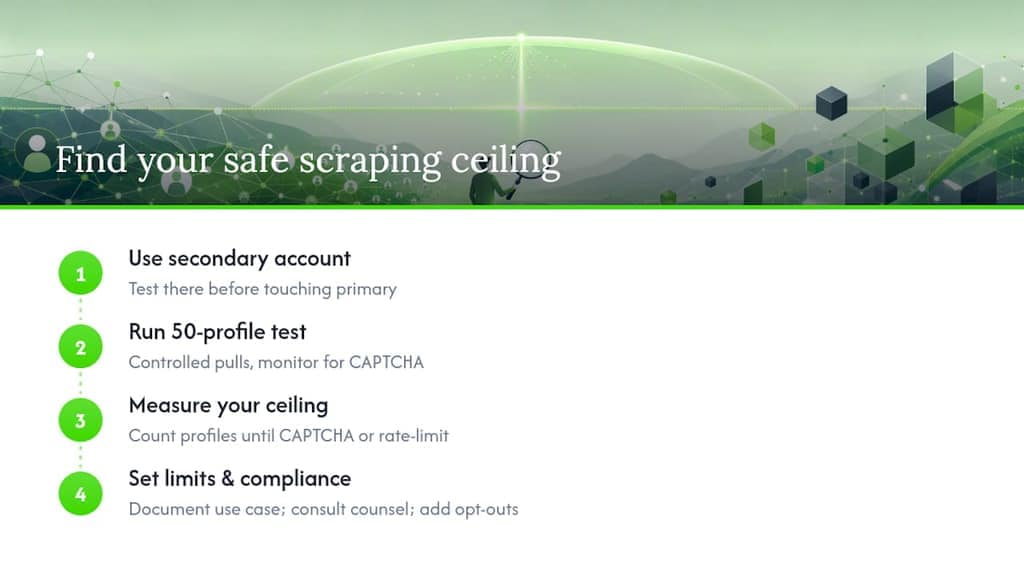
One workflow worth adopting regardless of which tool you pick: run a controlled 50-profile test on a secondary account before touching your primary. Measure how many profiles you can pull before seeing a CAPTCHA or a rate-limit warning. That number is your real safe daily ceiling, not whatever the vendor's marketing page claims.
Mastros is the low-risk starting point for LinkedIn exports
If you are a recruiter, sales rep, or marketer who needs clean LinkedIn or Sales Navigator exports without the overhead of proxy management, CAPTCHA services, or cloud data handling, the Mastros LinkedIn & Sales Navigator Data Exporter is the practical first step. It runs as a Chrome extension, processes everything locally, and exports to CSV, JSON, or JSONL in a format that drops straight into your CRM or spreadsheet.
There are other routes: PhantomBuster for no-code automation chains, Bright Data for enterprise-scale pipelines, Apify for custom engineering builds. Each has its place. But for teams that need reliable exports without building a proxy stack or handing session data to a third-party server, Mastros is the lower-friction option. No proxy costs, no CAPTCHA budget, no data leaving your browser.
Try the free tier of the Mastros LinkedIn scraper and run your first Sales Navigator export in under five minutes.
Useful sources and further reading
A short note on vendor pricing: always check whether a tool's listed price includes proxies and CAPTCHA solving. Most do not. The Scrapingdog benchmark write-up is one of the clearer public references for per-profile cost ranges and hidden stack costs. For workflow integration signals, the Derrick comparison is useful for understanding how native Google Sheets support factors into small-team buying decisions.
| Source | What it covers |
|---|---|
| HiQ Labs v. LinkedIn (Wikipedia) | U.S. legal precedent on public-data scraping under the CFAA |
| linkedin-cli on GitHub | Practical Voyager API interception pattern using Playwright |
| Scrapingdog 2026 roundup | Per-profile pricing benchmarks and TCO examples |
| Derrick tool comparison | Google Sheets integration and small-team workflow signals |
| Vayne.io G2 reviews | Safe-volume and throughput data for Vayne.io |
| PhantomBuster G2 reviews | Feature, auth-model, and ban-risk observations |
| Bright Data G2 reviews | Enterprise proxy architecture and cost floor |
| Apify G2 reviews | Engineering-first, actor-based pipeline suitability |
FAQ
What is the best LinkedIn scraper for recruiters in 2026?
For most recruiters, a privacy-first browser exporter like Mastros is the best starting point: low ban risk, local data processing, and clean CSV output for ATS or CRM imports. For high-volume Sales Navigator work, Evaboot adds deduplication and email enrichment on top of that baseline.
Is scraping LinkedIn legal in the United States?
The HiQ Labs v. LinkedIn ruling held that scraping publicly visible LinkedIn data does not violate the Computer Fraud and Abuse Act, but it does not override LinkedIn's Terms of Service or state privacy laws. Consult legal counsel before running large-scale or commercial scraping operations. This is general information, not legal advice.
How many LinkedIn profiles can you safely scrape per day?
Browser extensions operating inside a normal user session typically stay safe at 200–500 profiles per day on a single account. Cloud tools with proxy rotation can go higher, but the safe ceiling depends on proxy quality, request throttling, and how well the tool mimics human behavior.
What hidden costs should I budget for a LinkedIn scraping stack?
Beyond the tool's subscription price, budget for residential proxies ($50–$200/month at moderate volume), CAPTCHA-solving services, and secondary LinkedIn accounts. As Scrapingdog's benchmarks show, these line items often exceed the tool's base subscription for teams running at scale.
What is the difference between a browser extension scraper and a proxy/API scraper?
A browser extension scraper runs inside your authenticated LinkedIn session on your own device, keeping data local and behaving like a normal user. A proxy/API scraper routes requests through external servers and proxy pools, enabling much higher volume but introducing third-party data handling and higher ban risk if not properly throttled.